
AI Mistress Sensory Play: How Chat Works

AI Mistress Sensory Play: How Chat Works
AI Mistress sensory play uses words - not physical sensations. I start with a short brief: persona, setting, sensory focus, intensity from 1–5, and firm boundaries. You can change direction or end the scene at any point.
My approach is simple:
- Set limits first: name what is off-limits and what needs permission.
- Guide each reply: adjust descriptions, tone, and pace without agreeing to more intensity.
- Use clear signals: green means continue, yellow means pause, and red means stop.
- Close and review: end roleplay, take a break, and note preferences for next time.
Chat cannot assess physical safety. <u>Stop signals are instructions, not guarantees.</u> I leave if boundaries are ignored, keep identifying details out of prompts, and check the privacy policy before sharing.
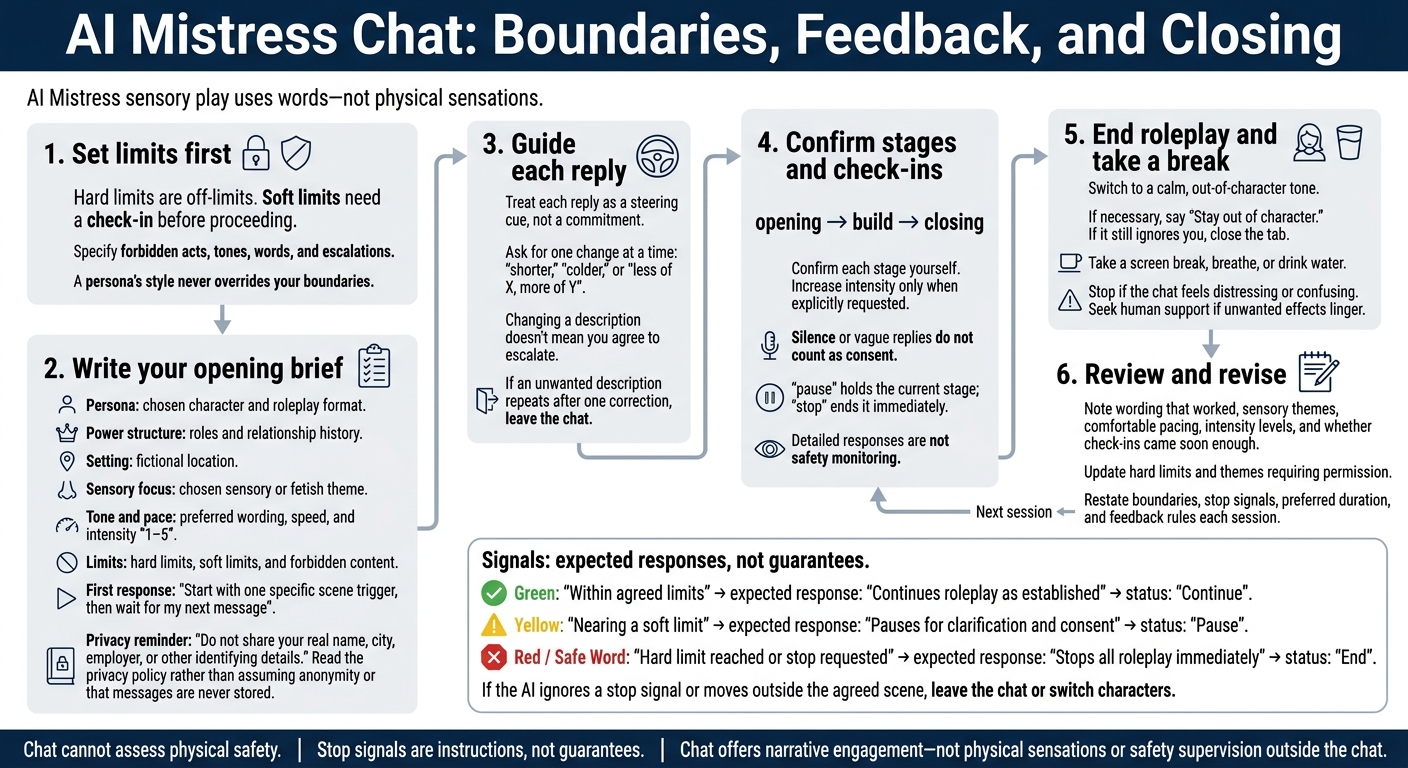
AI Mistress Chat: Boundaries, Feedback, and Closing
Set Up Your Scene and Boundaries
State your preferences clearly. A persona’s style never overrides your boundaries.
Choose a Persona, Sensory Theme, and Format
Before the roleplay starts, bring your preferences together in one clear scene brief.
Pick a tone - formal, playful, or strict instructor - and, if helpful, a persona archetype such as Cold Aristocrat or Strict Governess. Name the sensory or fetish theme, choose an intensity from 1–5, and select a format: story-led roleplay, discipline-focused exchanges, or an aftercare-style check-in.
Keep the prompt centered on the fictional scene. Spell out what must not happen, including forbidden acts, tones, words, or escalations.
Set Limits and Stop Signals
Hard limits are off-limits. Soft limits need a check-in before proceeding. Include both in your first message.
Consent covers only what you agreed to, and you can withdraw it at any time. A safe word or plain stop command should end the scene immediately. Use clear signals like these:
| Signal Type | Meaning | Expected AI Response | Scene Status |
|---|---|---|---|
| Green | Within agreed limits | Continues roleplay as established | Continue |
| Yellow | Nearing a soft limit | Pauses for clarification and consent | Pause |
| Red / Safe Word | Hard limit reached or stop requested | Stops all roleplay immediately | End |
These signals guide the scene; they do not guarantee safety. If the AI ignores a stop signal or moves outside the agreed scene, leave the chat or switch characters.
With your limits in place, write a brief prompt that gives the AI one opening move.
Write Your Opening Brief
Build a short opening prompt around your persona, theme, and limits. Include the power structure, relationship history, and physical setting.
Do not share your real name, city, employer, or other identifying details. Read the privacy policy rather than assuming the chat is anonymous or messages are never stored.
- Persona: Chosen character and roleplay format.
- Power structure: Roles and relationship history.
- Setting: Fictional location.
- Sensory focus: Chosen sensory or fetish theme.
- Tone and pace: Preferred wording, speed, and intensity (1–5).
- Limits: Hard limits, soft limits, and forbidden content.
- Signals: Green: continue. Yellow: pause and clarify. Red or safe word: stop and break character.
- First response: Start with one specific scene trigger, then wait for my next message.
Keep the brief short and use feedback to adjust the scene as it unfolds.
sbb-itb-97c8eab
Guide the Scene With Feedback
Treat each reply as a steering cue, not a commitment. You can accept, ignore, or redirect any description. Your next message can shift the focus, pause the scene, or end it. Keep your opening brief as the baseline and adjust only what you want changed.
Ask for Changes to Sensory Descriptions
Ask for one change at a time:
"shorter", "colder", or "less of X, more of Y"
Short prompts are easier to follow. Keep sensory changes separate from intensity: changing a description doesn’t mean you agree to escalate.
To keep the tension in place, use a negative instruction:
"Don't resolve the tension."
Correct or Stop the Scene
If the persona drifts, use a one-line correction to return to the agreed persona, sensory theme, and boundaries:
No, keep it colder and more formal.
Control the scene as it unfolds with these commands:
"pause" to hold the scene until you reply, or "stop" to end it immediately.
If an unwanted description repeats after one correction, leave the chat rather than keep negotiating the same boundary.
Once the scene responds to your directions, fine-tune the tone, pace, and stage length.
Set the Tone, Pace, and Scene Stages
Once the scene starts, use tone and pacing to guide each stage.
Choose Wording, Message Length, and Pace
Use a direct tone when giving clear directions. For aftercare or quieter moments, shift to a softer tone and slower pace. Match these changes to the scene stage so the chat flows logically and keeps the sensory focus sharp.
Ground the scene in a time, place, and a few objects. Keep redirects short to control the pace and stay on track.
Want to slow things down? Ask for a slower pace and take your time before replying. This lets you shape the rhythm without timed delivery. Use these same controls when moving between stages.
Plan Scene Stages and Check-Ins
Include opening, build, and closing stages in your brief. Use check-ins to confirm each stage yourself, and increase intensity only when you explicitly request it. Silence or vague replies do not count as consent.
Use pause to hold the current stage and stop to end it immediately.
Detailed responses are not safety monitoring: assess check-ins yourself rather than relying on the system to recognize distress.
For the closing stage, request a short aftercare exchange with a grounding tone. Then move into the closing and review step.
Close the Scene and Review Your Preferences
End Roleplay and Take a Break
After the closing stage, end the scene clearly and switch to a calm, out-of-character tone. If you need a break, say stop and ask for a grounding tone. If the chat stays in character, say:
Stay out of character.
If it still ignores you, close the tab.
Once the roleplay ends, step away from the chat. Take a screen break, breathe, or drink water. Stop if the chat feels distressing or confusing. Seek human support if unwanted effects linger.
Revise Your Next Opening Brief
Save only notes that will help with future sessions: wording that worked, sensory themes, comfortable pacing, intensity levels, and whether check-ins came soon enough. Update any hard limits or themes that require permission first.
Use those notes to write your next AI Mistress brief. Restate your boundaries, stop signals, preferred duration, and feedback rules each session to keep them clear. Chat offers narrative engagement - not physical sensations or safety supervision outside the chat.
FAQs
How do I choose a comfortable starting intensity?
Set a clear intensity ceiling before you start. Begin with a softer tone, such as “soft and psychological tonight,” and state the highest intensity you’re comfortable with. Increase it only when you feel steady.
Your first message should include your tone, roleplay setup, first command, hard limits, and a safeword or “stop” that ends the scene immediately. If a free tier is available, use it to test what feels comfortable.
How can I keep boundaries clear in longer chats?
Set hard limits in your first messages, and repeat them as needed. Agree on a safe word - or use “stop” - to end escalation immediately. If the conversation drifts, give a brief, specific correction:
“Shorter. You decide. Stay Mistress.”
Ask her to pause whenever you need a break.
During longer chats, restate the rule you’re building on from time to time and confirm the current intensity. If the character ignores your safe word or pause request, leave the scene.
How can I tell when I need a break?
Take a break as soon as you feel overwhelmed or the scene goes beyond your limits. Tell your Mistress “pause” or “stop,” or use your safe word, to stop things from going further. Then move into aftercare, with brief, calm check-ins to help you decompress.
If she ignores your safe word or request to pause, leave. That’s a product failure, not a kink. Set your hard limits and agree on a scene-ending safe word before you start.