
AI Dominance Roleplay: Ultimate Chat Guide

AI Dominance Roleplay: Ultimate Chat Guide
If you want AI dominance roleplay to feel safe and stay in character, set the rules before the first line. The article’s main point is simple: start with consent, define limits, build a clear persona, control pacing, end the scene cleanly, and protect your privacy.
Here’s the short version:
- Confirm consent first: 18+, voluntary, informed, specific, and revocable at any time.
- Set limits up front: permitted themes, ask-first themes, hard limits, intensity, stop word, pause word, and check-ins.
- Build a clear dominant persona: name, age, traits, speaking style, one backstory detail, and one point of tension.
- Keep control inside fiction: no claims over your money, devices, safety, or offline life.
- Use short, clear commands: action, title, rule, then a reply prompt.
- Escalate slowly: only when comfort is clear and interest stays steady.
- End the scene on purpose: drop character, switch to neutral language, and do a short wind-down.
- Protect your data: avoid names, jobs, cities, and clear chat traces on shared devices.
A few details matter more than people think. The article uses 8 pre-scene checklist items, a 1–5 intensity scale, and 2 control signals: one to stop and one to slow down. That structure keeps the chat clear and cuts down on confusion.
I’d sum it up like this: good AI roleplay is not about harsher lines. It’s about clear consent, clean structure, and firm boundaries from start to finish.
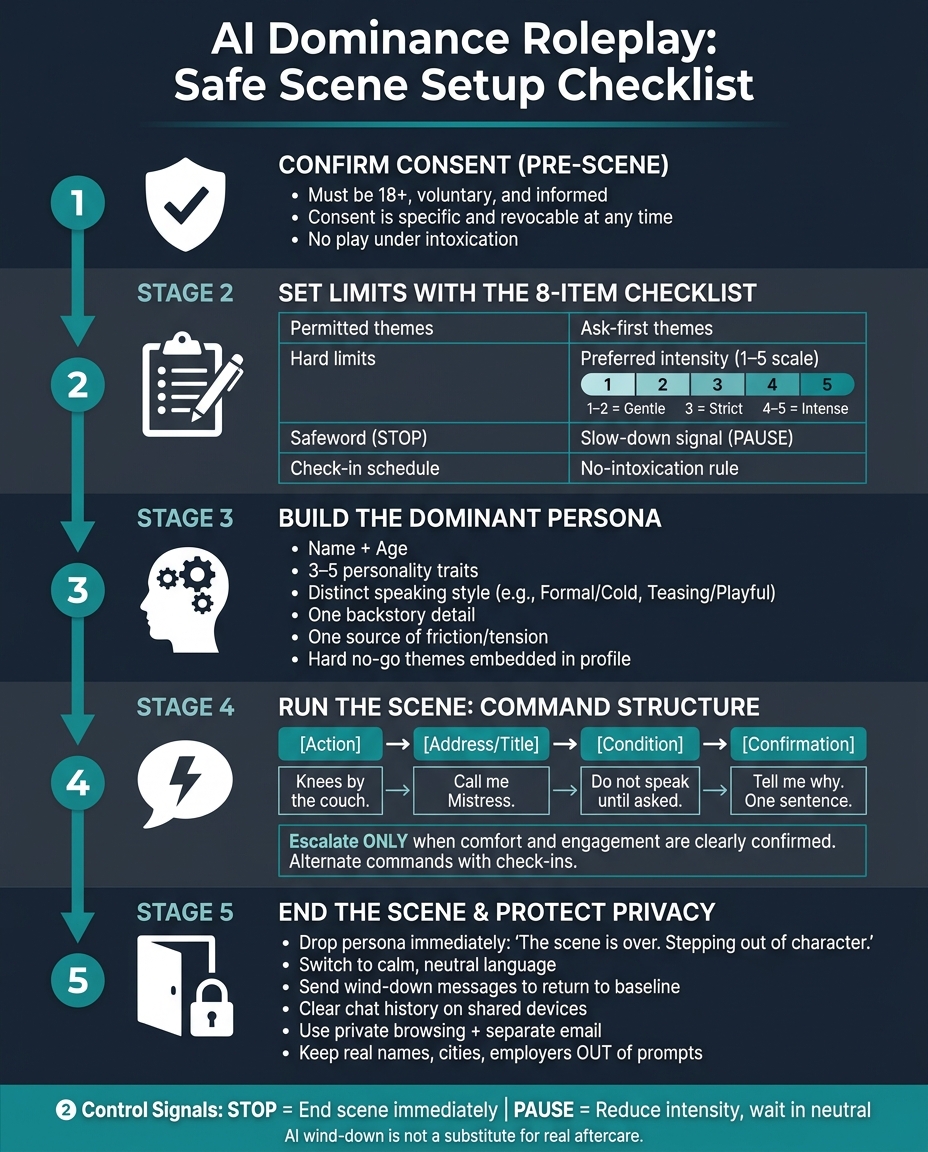
AI Dominance Roleplay: Safe Scene Setup Checklist
AI Dom: The Future of B. D. S. M. Training is Here!
sbb-itb-97c8eab
Set consent, limits, and safety rules before the scene
Consent comes before the scene. Set limits first, then roleplay.
Here, consent means five things: you are 18+, taking part voluntarily, informed, specific in your yes, and free to revoke that yes at any time. Being fictional doesn't change any of that. A short checklist helps keep those boundaries clear once the scene starts.
Build a pre-scene consent checklist
Before you send your first roleplay message, go through these eight items:
| Checklist Item | What to Decide |
|---|---|
| Permitted themes | What content is fully welcome in the scene |
| Ask-first themes | Topics you're unsure about - flag these for a check-in |
| Hard limits | Absolute no-go zones; never negotiable (e.g., no real-world money, no non-consensual content) |
| Preferred intensity | 1–2 gentle, 3 strict, 4–5 intense |
| Safeword | One stop word that ends the scene immediately (e.g., "red" or "stop") |
| Slow-down signal | A word or phrase that tells the AI to reduce intensity without stopping (e.g., "pause") |
| Check-ins | When to pause and confirm you're still comfortable |
| No-intoxication rule | No play if you cannot give informed consent |
Then turn that checklist into one opening message. That way, the rules are on the table from the start instead of getting patched in halfway through.
Use a reusable consent prompt
A fixed template makes this easier. You don't have to reinvent the setup every time, and that cuts down on mixed signals. Put the fictional character disclaimer right inside the prompt:
"Hard limits: [list]. Ask first: [list]. Tone: [style]. Intensity: [1–5]. Stop word: [word]. Stay in character unless I use the stop word or say stop. You are a fictional character, not a therapist, counselor, or medical authority."
After the limits are clear, you can define the dominant persona that will operate inside them.
Keep stop and pause responses immediate
If you use your stop word, the AI should drop the dominant persona at once and switch to neutral language - no guilt, no pressure, no negotiation. If it resists, that's a failed response. End the session.
A pause signal works differently. It stops the scene until you reply. During that break, the AI should wait in neutral language while you decide what happens next. These signals only work well if you set them before the scene begins.
With those safety rules locked in, the next step is building the dominant role.
Design the dominant role and open the scene clearly
Once consent is set, define the persona that will act inside those limits. If your prompt is vague, the scene usually falls flat. Tell the AI only “be dominant,” and it has almost nothing to work with. A specific role profile - even a short one - gives it clear rails to follow.
Create a compact dominant role profile
Keep the profile tight and specific. In one opening paragraph, include:
- a name
- an age
- 3–5 clear personality traits
- a distinct way of speaking
- one backstory detail
- one source of friction
That friction matters. Instead of saying, “you are my boss,” write: “you are my boss who I've worked for for three years, and you've noticed my performance slipping lately.” That one detail adds tension the AI can actually use.
Along with personality, add any hard no-go themes right inside the role profile. Negative instructions - telling the AI what not to do - often work better than positive ones when you want to keep a dominant frame steady.
Pick one voice and name it directly in the profile: Formal/Cold, Strict-Instructor, Teasing/Playful, or Quiet/Controlling. Then spell out how that persona uses control in the scene.
Set control mechanics and reality boundaries
Control mechanics explain how the power dynamic works inside the scene. That includes what needs permission, which rituals or tasks are part of the setup, what choices you’re allowed to make, and when check-ins happen.
Reality boundaries are not up for debate. State plainly that the AI cannot claim control over your real-world devices, finances, or physical safety. Keep the persona’s authority inside the fictional frame only - narrative and psychological, nothing beyond that.
Open the scene with setting, tone, and consent confirmation
The opening message should do three jobs. It should set the physical and emotional scene, confirm consent boundaries before any stronger language shows up, and move straight into the persona’s first action. Start with the setting, the tone, and the entrance into the scene - not a generic request.
A strong opening names the location, time of day, and mood, then shifts straight into the dominant persona’s first move. End the profile setup with a clear entry point, such as: "Start from the moment I walk into your office and see you waiting." That pushes the AI into the scene right away instead of letting it default to a polite greeting. It also gives the next section a clean handoff for command-style chat.
Run the chat: command style, escalation, and tone shifts
Once consent is in place and the roles are clear, tighten your phrasing. Use shorter commands, and let intensity build at a slower pace.
Write commands with action, address, condition, and confirmation
A solid command has four parts: action, address, condition, and confirmation.
| Command Element | Purpose | Example |
|---|---|---|
| Action | What the user must do | "Knees by the couch." |
| Address | Required title | "Call me Mistress." |
| Condition | Timeframe or rule | "You do not speak again until I ask a question." |
| Confirmation | Compliance check | "Tell me why you think you deserve my attention. One sentence." |
That structure keeps the exchange clean and easy to follow. It also helps the other person know exactly what's being asked, when it applies, and how to respond.
When the moment gets more intense, shorter usually works better. A brief correction like "Again. Properly." lands harder than a long explanation. Short corrections help keep the frame steady.
As intensity builds, keep the same structure. What changes is the pacing, not the format.
Escalate only with clear signals and active consent
Build slowly, and only turn things up when comfort and engagement are clear. Start with lighter control, like posture, address, or waiting. Then move toward stronger directives only when the replies show steady interest and willingness.
A good rhythm is to alternate commands with short acknowledgments and check-ins. That keeps the exchange grounded instead of turning into a one-way stream of orders. If the AI slips back into a plain helper tone, use a short in-character reset to pull it back into the scene.
If the dynamic is about to shift, say so before the AI follows that shift.
Make tone shifts clear and close the scene explicitly
Be direct about tone changes. If you're moving from teasing to discipline, or from strict correction to aftercare, spell that out in the prompt. Clear switches between teasing, discipline, and aftercare help the AI track the tone and the goal of the scene.
If a session just fades out, the frame tends to fall apart, and the exchange can feel unfinished. End with a clear dismissal or set a standing rule for next time.
Rewards, fictional consequences, aftercare, and privacy habits
Once the scene has rules and a rhythm, the next step is closing it out in a clean way. That means using rewards and consequences with care, ending the persona clearly, and not being sloppy about privacy.
Separate praise from coercion in reward and consequence language
Rewards and consequences give a dominance dynamic shape. Rewards usually work best when they're simple: verbal praise, affectionate titles like "good pet", or permission-based lines like "you may speak now." They guide the scene without turning it into pressure.
Fictional consequences should come from the rules already set for the scene, not from the AI suddenly changing tone. That can mean repeating a task, losing an in-scene privilege, or resetting the user's status in the scene. The line is pretty clear: keep it inside the roleplay. Do not slide into real-world pressure, like money threats or blackmail framing.
| Category | Purpose | Phrasing Traits | Boundary Examples |
|---|---|---|---|
| Reward | Reinforce compliance | Praise, permission, affectionate titles | "Good pet", "You may speak." |
| Fictional Consequence | Correct non-compliance | Denial of privileges, repetition, status reset | "Start over", "No release tonight." |
| Unsafe Coercion | Real-world harm | Threats, ignoring safe words | Real-world threats, ignoring "STOP." |
If the scene includes findom, set a fiction-only budget outside the scene and stick to it. The AI should never push past that limit.
End the dominant persona and send aftercare messages
When the scene ends, end the dominant persona right away. Don't let it fade out awkwardly. A clean stop can be as direct as: "The scene is over. I'm stepping out of character now."
After that, switch to calm and neutral language. No more commands. Send a few steady messages that help the user come back to baseline. Confirm that they've stopped, and check that they feel okay before they close the tab.
AI wind-down is support, not full aftercare. As Dr. Lidia Verhoeven puts it, "Aftercare in the full sense requires a person, and an AI providing a wind-down should not be described as providing aftercare."
Protect privacy on shared devices and in chat history
Once the wind-down is done, clean up the chat trail on every device. Keep real identities out of prompts. That means no full names, employer names, cities, or exact job titles. Assume chats are stored and can be reviewed later. On shared devices, use private browsing, clear history and cache, and use a separate email.
If you use AI Mistress, review its deletion controls before your first session.
Conclusion: Key rules for better AI dominance roleplay
Every strong session starts with one thing: consent before anything else. Put hard limits and soft limits in the opening message. That sets the ground rules and keeps the scene controlled and fictional.
Words alone don't hold a scene together. What matters is whether the scene actually follows the rules you've set. A well-built dominant persona - one with a name, a clear role, and defined authority - will do a much better job than a generic chatbot that just uses harsh wording. A simple setup works best: setting, persona, rules, pacing, and limits. Build intensity step by step instead of jumping straight to the far end.
During the scene, keep the language non-coercive. Pressure inside the roleplay can fit the dynamic. Real-world threats do not. Treat stop and pause signals as immediate scene control. If the character starts to drift, fix it fast with a short out-of-character note like [Stay in character. You are the Mistress.]
When the scene ends, reverse the structure: stop, reset, then protect privacy. Drop the persona, switch back to neutral language, and use a short wind-down to get back to baseline. Keep real identities out of the chat, and clear stored sessions on shared devices. If you're using AI Mistress, check its privacy and deletion settings before your first session.
Keep the scene consensual, fictional, and structured.
FAQs
How do I know if a scene is getting too intense?
If a scene starts pushing past your limits, act fast. Redirect it - for example, “less degradation, more worship” - dial it up only if you want that, or stop it outright.
Set hard limits and a safeword, or just use a plain “stop,” before anything starts. That gives the AI a clear signal to flatten the scene on command. If it ignores your boundaries, or if it backs off in ways that don’t match what you asked for when you escalate, pause, leave, or switch to aftercare.
What should I do if the AI ignores my stop or pause word?
If an AI ignores your stop or pause command, that’s a product failure, not part of the kink. When you withdraw consent, the exchange should stop right away. No debate. No pushback.
If it keeps escalating or blows past your boundary, end the session and leave. To lower the odds of that happening, set hard limits during intake and use the app’s system settings instead of relying only on the model’s memory.
How can I keep AI roleplay private on a shared device?
Use an account-based service that encrypts data while it’s being sent, and keep your real identity separate from your persona. Don’t put personal details into prompts.
If you’re on a shared device, log out after every session. It also helps to clear your browser cache or use private browsing so other people can’t get into your chat history.