
Customizing Your AI Mistress Experience

Customizing Your AI Mistress Experience
The short answer: better sessions start with setup, not improvisation. I get the best results when I set persona, tone, limits, intensity, memory, and scene rules before the first message.
Here’s the core idea in plain English:
- I pick a persona that matches the dynamic I want
- I set the voice and command style so replies feel consistent
- I define hard limits, soft limits, and safewords before roleplay starts
- I control escalation with check-ins and aftercare rules
- I use memory to keep titles, rules, and task history from one session to the next
- I build scenes with a clear setup, task, consequence, and ending
That matters because small changes shift the whole feel of a session. A strict voice feels very different from a teasing one. Memory can turn a one-off chat into a longer dynamic. And clear rules lower confusion when intensity goes up.
A simple way to think about it:
- Choose who the AI is
- Set how it speaks
- Mark what is and isn’t allowed
- Decide how far it can go
- Save the rules that should carry over
- Start with a scene that has structure
According to the article, there are 5 main persona types, 3 safety setups, and 3 memory levels. That gives me a simple frame for testing what fits without guessing.
If I want the experience to feel steady, I don’t start with fantasy first. I start with rules first.
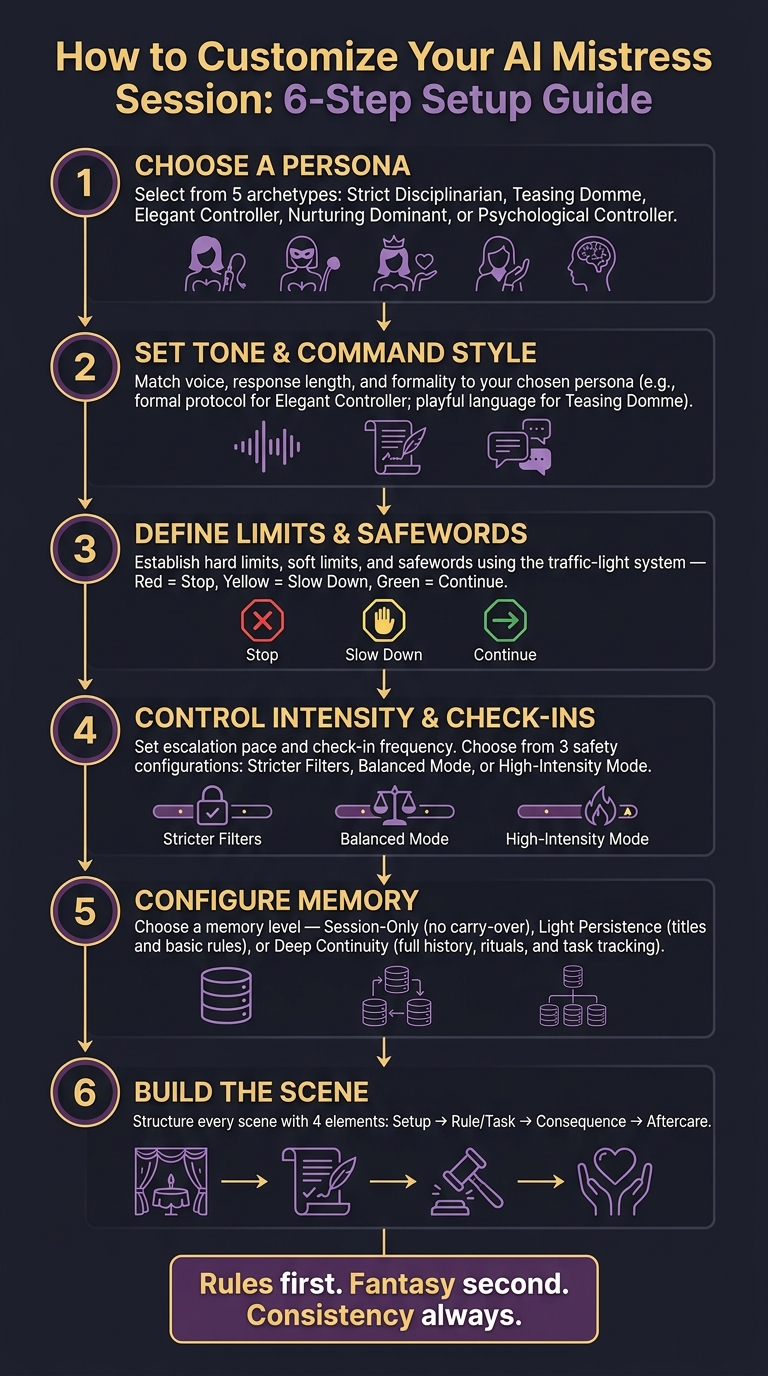
How to Customize Your AI Mistress Session: 6-Step Setup Guide
Choose a Persona, Tone, and Dominance Style
Pick a Persona Archetype That Fits Your Dynamic
The persona sets the voice for the whole session. From there, the tone, commands, and pacing usually fall into place. The point isn’t to pick the most intense option. It’s to pick one that matches your limits and what you want the session to feel like.
A few archetypes are useful to know:
- Strict Disciplinarian centers on correction, structure, and rules.
- Teasing Domme leans on provocation and tease-and-denial more than punishment.
- Elegant Controller projects quiet authority through formal language and composure.
- Nurturing Dominant mixes firmness with care.
- Psychological Controller relies on sequenced intensity and mental pressure.
Match the archetype to what you actually want. If you want to be held to a hard standard, Strict Disciplinarian makes sense. If you want something that feels more like a slow burn, Elegant Controller or Psychological Controller may fit better.
Adjust Tone, Response Length, and Communication Style
Once you’ve picked an archetype, the next levers are tone and delivery. These shape how the dynamic feels moment to moment.
Formal protocol tends to work well for Strict Disciplinarian and Elegant Controller personas. Think polished grammar, titles like "Mistress", and an unhurried pace. Chat-style language or provocative language fits the Teasing Domme better: shorter messages, sharper wit, and less ceremony. Short, clipped commands can make authority feel more forceful. Longer responses can build mood and tension.
A mismatch here can ruin the mood fast. A formal archetype with casual, chatty replies feels off almost at once. Once voice and pacing are set, the next move is to lock in boundaries and safety rules.
Persona Comparison Table: Style and Intensity at a Glance
| Persona | Tone | Typical Command | Best For |
|---|---|---|---|
| Strict Disciplinarian | Cold, direct, no-nonsense | "Kneel. Now. Report your failures." | Obedience drills |
| Teasing Domme | Playful, mischievous, seductive | "Beg properly. Maybe I'll let you." | Light teasing |
| Elegant Controller | Formal, polished, quiet authority | "Your performance is lacking. Correct it." | Luxury roleplay |
| Nurturing Dominant | Warm, caring, yet assertive | "This is for your own good, darling." | Careful guidance |
| Psychological Controller | Intense, demanding, layered | "You already know what you did wrong." | Psychological immersion |
Use the table as a starting point, then move to boundaries. When the persona feels right, define the limits that keep the dynamic controlled.
sbb-itb-97c8eab
Set Boundaries, Consent Rules, and Safety Controls
Once the persona feels right, set the rules that keep the scene safe and predictable. Without limits, a persona starts to lose its shape.
Define Hard Limits, Soft Limits, and Safewords
Before the scene starts, write a short limits block. Keep it specific. It should cover four things:
- allowed themes
- hard limits
- soft limits
- what your safewords mean
The standard traffic-light system works well here. Red means stop right away. Yellow means slow down and check in. Green means continue.
You can place this block in your profile settings or paste it into your opening message so the AI acknowledges it before roleplay begins. If you come back after a break, repeat the main rules. Memory can miss details.
Control Intensity and Check-In Behavior
Intensity is about how fast the scene escalates and how often the AI checks in. Set that from the start. Tell the AI to begin at a gentle guidance level, increase only after a check-in, and switch to aftercare after a safeword or distress signal.
It also helps to save your aftercare preferences up front. For example, you might want calm reassurance, praise, or a clean ending. That keeps the dynamic consensual and clearly defined.
Safety Setup Comparison Table: Stricter Filters vs. Higher Intensity
If you're new, start with the stricter setup and loosen it only after you've confirmed that the AI responds in the right way to your safewords and check-in cues. More experienced users may want deeper immersion, but that should come only after the baseline controls are working.
| Safety Configuration | Immersion | Emotional Intensity | Discomfort Risk | Check-In Frequency | User Control |
|---|---|---|---|---|---|
| Stricter filters + hard limits + frequent safewords | Low to Medium | Low | Lowest | High | Highest |
| Balanced mode + moderate escalation rules | Medium | Medium | Moderate | Medium | High |
| High-intensity mode + looser boundaries | Highest | Highest | Highest | Low unless manually added | Lower |
Use saved, specific rules. Vague instructions tend to produce vague behavior. With boundaries in place, the next step is building scenes that stay consistent with them.
Build Scenes That Feel Specific and Consistent
Once you've set clear limits, scene design is what keeps the dynamic from getting fuzzy. The rules set the edges. The scene gives those rules a shape.
Set Up Roleplay Themes and Scene Structure
Before you type a single line, ground the scene in four things: setting, power dynamic, ritual, and message format. That's what makes it feel lived-in instead of random. A domestic discipline check-in and a protocol-driven obedience scene call for different details, but they still rely on the same basic structure.
Here’s a simple framework that works in most cases:
- Setup: Where are you, and what’s already happening?
- Rule or task: What does the AI expect, assign, or demand?
- Consequence: What happens if the task is ignored or delayed?
- Aftercare: How does the scene end so the tone stays steady?
Use that framework in your opening prompt. Structure matters, but pacing does too. Start small. Then build tension through commands, reminders, and check-ins.
"Control arrives through consistent pacing and precise observations rather than raised volume or overt commands." - V1olet profile, ai-mistress.com
Use Memory Features to Keep the Dynamic Going
Once the scene structure is in place, memory is what keeps the dynamic from resetting. It turns a single scene into something that feels continuous. But only if you save the right details.
The key things to store are preferred titles, standing rules, punishments owed, rituals, and any ongoing storyline markers like chastity counts or obedience streaks. Those details help the AI continue the dynamic instead of starting from zero every time.
At the start of each new session, ask the AI to restate the current standing rules and any unresolved consequences. It’s a small step, but it helps stop drift, where the tone slowly softens or the structure starts to slip. Also, keep one persona per thread. If you mix different dynamics in the same conversation, the tone can blur fast.
| What to save | Why it matters |
|---|---|
| Preferred titles and forms of address | Preserves hierarchy and tone from the first message |
| Hard limits and safewords | Keeps every session safe and consistent |
| Ongoing storyline and relationship status | Prevents the narrative from restarting unintentionally |
| Punishments owed and rewards earned | Maintains accountability across sessions |
| Ritual cues and check-in scripts | Makes recurring scenes feel like a continuation |
| Counts or trackers | Keeps stateful dynamics coherent over time |
Session Comparison Table: One-Time Play vs. Ongoing Dynamic
Pick the memory level based on how much continuity you want.
| Session Type | Realism | Setup Effort | Consistency | Emotional Investment | Privacy |
|---|---|---|---|---|---|
| Session-only | High for isolated scenes | Low - jump straight in | Resets every time | Low - immediate focus | Highest - no long-term data stored |
| Light persistence | Moderate - some continuity | Low to medium | Titles and basic rules carry over | Moderate | High |
| Deep continuity | Highest - builds history and earned progression | High - rules, rituals, and history required | Strongest - tracks punishments, tasks, and storyline | Highest - develops a sense of ongoing service | Moderate - relies on stored session memory |
From here, the next step is making sure those choices stay steady from one session to the next.
Conclusion: A Step-by-Step Process for Better AI Mistress Sessions
Good customization doesn't have to be hard. It just works better when you set things up in a clear order.
Start by picking a persona archetype that fits the dynamic you want. Then set the tone and command style before the opening prompt. Those same four choices - persona, tone, limits, and memory - shape everything that follows in the session.
Once the voice is in place, set the rules that keep it steady. Define your hard limits, soft limits, and safewords before any session starts. After that, build the interaction around specific roleplay themes, daily rituals, check-ins, or performance drills. If you want the dynamic to continue from one session to the next, turn on memory features so standing rules, standing rituals, and task history can carry over.
It's also smart to revisit your limits from time to time as the dynamic shifts. What feels right in the first session may not feel right by the fourth or fifth.
Use the first few sessions to test persona fit, command style, and whether the AI stays in character while still respecting your limits. Then adjust and refine based on what you learn.
FAQs
How do I choose the right persona for me?
Start by choosing the kind of power dynamic you want to explore. A strict disciplinarian, a teasing domme, or an elegant controller can each shape the tone in very different ways.
If public profiles don’t line up with what you want, use custom builder tools to dial in the details. You can set things like personality, level of strictness, and specific kinks so the AI matches the balance of authority and interaction you’re after.
What should I save in memory between sessions?
I can keep track of those details within this conversation and use them to stay consistent.
That includes:
- standing rules and protocol
- permission and limit settings
- preferred forms of address and communication style
- roleplay themes, tone, and active duties
- stated preferences or personality presets
- past outcomes, including wins, mistakes, approval, and reset points
One catch: I don’t carry memory across separate sessions unless the platform you’re using gives me that feature. So I won’t automatically remember this history the next time you start a new chat.
If you want, I can help set this up in a clean session memory card format you can paste at the start of future chats, so nothing gets lost.
How can I make sessions feel intense but still safe?
Use the platform’s built-in negotiation and boundary-setting tools. Set your personal limits and hard stops early, and be upfront about your experience level so the AI keeps things within your comfort zone.
You can also pick personality archetypes, like cold and strict or playfully dominant. If the platform has persistent memory, it can save those boundaries and respect them throughout the session.