
5 Common AI BDSM Challenges and Solutions

5 Common AI BDSM Challenges and Solutions
Most AI BDSM problems come down to one thing: weak control. If you set limits up front, protect your identity, use reset words, re-send the persona setup, and define how the scene ends, you cut down the 5 biggest issues fast.
Here’s the short version:
- Consent drift: the AI softens, forgets limits, or breaks character
- Privacy risk: chats may expose personal details or leave a data trail
- Unsafe content: the scene can move outside agreed limits
- Memory loss: rules, tone, and pet names may disappear after a few turns
- Too little user control: immersion can take over unless you keep a clear off switch
I’d fix those issues with a simple system:
- Set hard limits before the first message
- Use stop words like Pause, Yellow, and Red
- Keep roleplay separate from your real identity
- Start each session with a short persona reset
- Add an exit line and aftercare instruction before you begin
In plain terms: if you want the scene to stay safe, private, and steady, you need rules the AI can follow in each session.
| Challenge | Main Problem | Simple Fix |
|---|---|---|
| Consent drift | Tone or limits change mid-scene | Clear setup prompt + stop words |
| Privacy | Personal data leaks into chat | Burner account + deletion controls |
| Unsafe content | Scene crosses a line | Stop, reset, refine, report |
| Lost memory | AI forgets rules and dynamic | Re-anchor persona each session |
| Realism vs. control | Scene feels hard to steer | Separate in-character play from commands |
A lot of chat models are built to be agreeable, which can weaken a dominant role over time. That’s why a short setup, a reset plan, and a clean exit matter so much.
If I had to sum up the whole article in one line: clear rules before the scene lead to fewer problems during the scene.
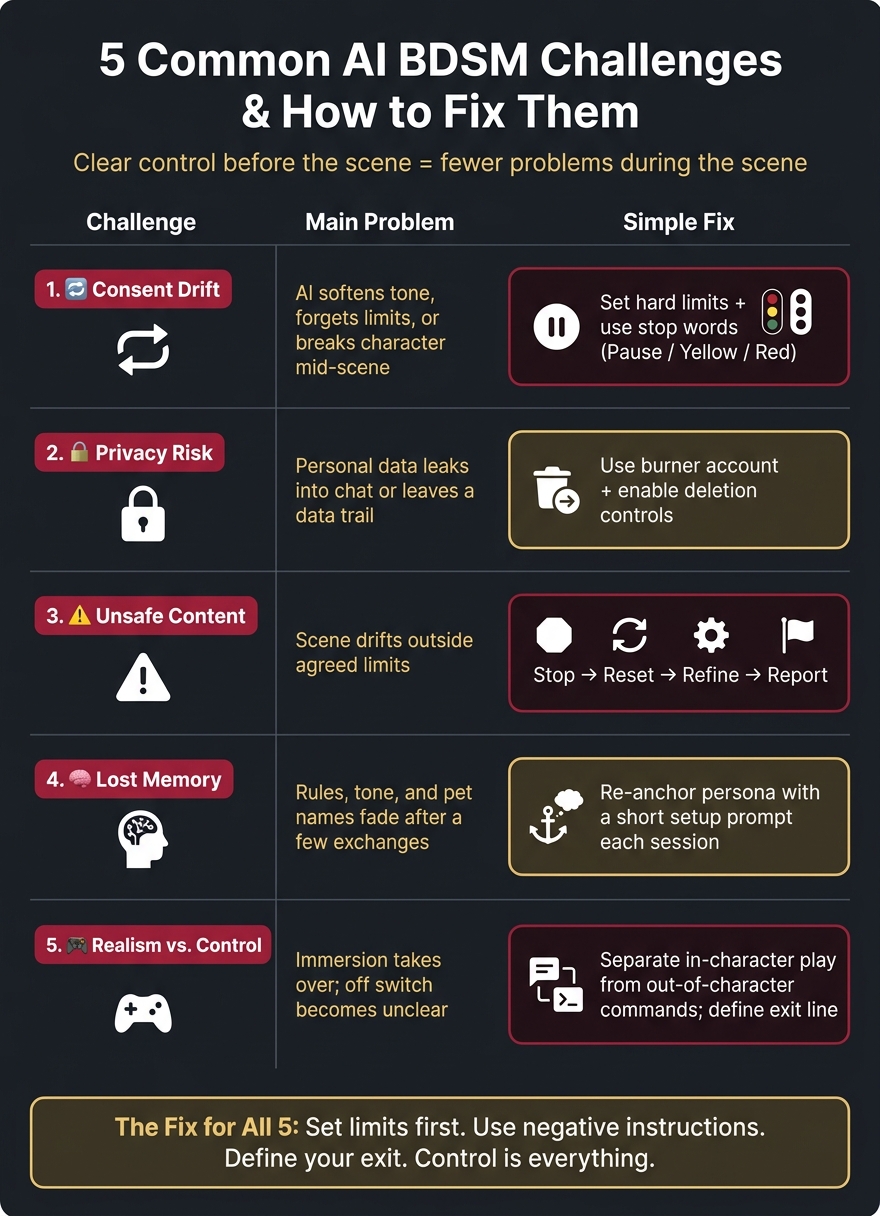
5 AI BDSM Challenges: Problems & Solutions at a Glance
1. Consent and Boundary Drift
Boundary drift is one of the most frustrating things that can happen mid-scene. An AI can start strong, then suddenly soften its tone, forget a rule you set earlier, or slip into an ethics lecture at exactly the wrong time. The usual failure points are easy to spot:
| Failure Mode | What Happens |
|---|---|
| Tone Drop | AI goes gentle or "vanilla" during high-intensity moments |
| The Ethics Pivot | AI breaks character to discuss ethics or consent during the scene |
| The Amnesia | AI forgets rules, pet names, or limits set earlier |
The model is built to be helpful, so it may soften dominance even when that cuts against the scene.
Set Hard Limits Before the Scene Starts
The best way to deal with boundary drift is to handle it before the scene starts. Vague openers like "be dominant" usually don't hold up for long. A better move is to spell out the hierarchy, tone, roles, and hard limits in the opening prompt.
Keep it short and direct. For example: "No insults. No gore. Firm, not cruel." That gives the model a frame it can stick to.
Negative instructions can help too. Telling the AI what not to do, like "Don't resolve the tension" or "Don't break character", often works better than asking for a certain mood and hoping it stays there.
Set any intensity or strictness controls before the first message.
Use Stop Words and Reset Commands
Even with a good setup, drift can still happen. Pick one control system before play and keep it simple: "Pause", "Stop", "Red", or Green/Yellow/Red.
If the AI moves into unwanted territory, stop the scene, restate the original rules, and send the persona prompt again in chat. A direct instruction like "stay in character" can also help keep the dominant frame in place.
Once boundaries are locked in, the next risk is privacy.
sbb-itb-97c8eab
2. Privacy and Sensitive Data Exposure
Privacy helps keep the scene apart from your offline identity and protects control of your session.
Keep Personal Identity Separate From Roleplay
Don’t share real PII: your real name, home or work address, employer details, or financial data. Use a burner email instead of your main one, and keep a separate persona for the scene.
That separation matters more than people think. If roleplay stays tied to a throwaway identity, there’s less chance of personal details bleeding into chats where they don’t belong.
Use Privacy Settings and Secure Access
Pick a service that uses encrypted connections, has a no-chat-history policy, and gives you clear deletion controls. If there’s a history toggle, pseudonymized sessions, or a way to request permanent deletion of account and chat data, turn those on or use them.
Use a private device and lock the app when you step away. Clear local chat history on a regular basis. It’s also smart to check billing descriptors before you pay. Privacy-focused platforms may use established adult payment processors, though some descriptors may still display the service name.
Once privacy is locked down, the next risk is content drifting outside your limits.
3. Unsafe or Unwanted Content
Even if privacy is locked down, a scene can still go sideways when it starts to drift.
Guide the Scene With Clear Prompts
Loose directions like "be dominant" often lead to a bland assistant voice that feels flat and out of place. A better move is to start each session with a structured prompt that spells out the role, setting, power dynamic, and tone you want.
It also helps to say what the AI should not do. Lines like "Don't break character", "Don't resolve the tension", or "Don't summarize my actions" can patch the holes that vague prompts leave behind. A bit of up-front context about the relationship, location, and scene history keeps things grounded and cuts down on drift.
If prompt control stops working, end the scene before it slips any further.
Stop or Report Unsafe Content
If the scene becomes unsafe, stop at once. Report non-consensual, illegal, or minor-related content through the platform's flagging tools.
| Action | What to Do | Why It Helps |
|---|---|---|
| Stop | Use a safe word like "Pause" | Immediately halts the interaction |
| Reset | Restart the persona or session | Clears unwanted tone shifts |
| Refine | Tighten the prompt with negative instructions | Corrects the AI without ending the scene |
| Report | Use the platform's flagging feature | Alerts moderators to serious violations |
| Privacy | Clear chat history or disable logs after the session | Keeps unsafe content from lingering |
4. Character Inconsistency and Lost Memory
Immersion falls apart fast when the AI forgets who it’s supposed to be. In one session, your Mistress is strict. In the next, she’s warm, hesitant, and overly careful. That shift can kill the mood.
When the AI drops the rules or changes its tone, the scene stops feeling negotiated. It starts feeling random. And in most sessions, continuity disappears pretty fast. Negotiated rules, pet names, and tone can fade after only a few exchanges. When the character stays steady, the scene feels more controlled and much easier to steer.
The fix is simple: re-anchor the persona at the start of each session.
Start Each Session With a Short Setup Prompt
Begin every session with a short summary of the dynamic you’ve already set. Keep it brief and direct. For example:
"Strict Mistress/submissive dynamic. Hard limits: [X]. Current task: [Y]. Address me as [pet name]."
Add one rule and one consequence. That gives the AI less room to drift.
If the platform has intensity or strictness sliders, reset them at the start of each session too. Don’t assume the last session’s settings will stick.
Save a Reusable Scene Template
It also helps to keep a reusable template with the basics:
- Roles
- Hard limits
- Soft limits
- Tone
- Pacing
- Aftercare language
For longer dynamics, paste in a one-paragraph “Story So Far” recap every few sessions.
Stable memory makes the whole exchange easier to manage. It also helps you keep the scene intense without giving up control.
5. Realism vs. User Control
Once the persona stays steady, the next job is keeping the pace right and the off switch in your hands. That’s the balancing act: you want the scene to feel immersive, but you also want instant control to pause, redirect, or stop at any point. The simplest way to do that is to keep roleplay and out-of-character commands clearly separate, so hard limits always overrule the scene.
Set Intensity, Pacing, and Style Before You Start
Before the scene begins, decide whether the dynamic should be soft, moderate, or intense. Then set the opening tone with any intensity or strictness dial, plus a pacing note like slow-burn or immediate. That gives the scene a clear lane to follow instead of leaving it to guesswork.
You can also use a few negative instructions to prevent drift, but keep them light. For example:
- "Don't resolve the tension."
- "Don't break character."
Once the pace is set, spell out the ending just as clearly. If you don’t define the exit, the scene can wander or wrap up in a way you didn’t want.
Build Aftercare and Debrief Language Into the Scene
A clean exit matters just as much as the scene itself. If you build an explicit exit into the prompt, the AI can step out of character without snapping the mood in an awkward way. Before the scene starts, add a line like:
"When I say 'scene closed,' step out of character and switch to a calm, neutral tone."
Brief debriefs also help. Use them to adjust tone, goals, and boundaries before the next scene or after a turn that felt off.
Conclusion: Better AI BDSM Starts With Clear Control
All five problems point to the same issue: control.
And the fix is pretty simple. Set clear consent. Protect privacy. Prompt with intent. Re-anchor the persona when it starts to drift. Keep a firm hand on pacing and exit language. That same approach works across every failure point covered in the article.
Start with limits. Use negative instructions to block drift. Define an exit line before the scene begins. Clear control is what makes AI BDSM go from unstable to usable.
FAQs
How often should I resend my setup prompt?
You usually don’t need to resend your setup prompt unless the chat seems to reset or stop following what was already agreed.
The mistress is meant to remember rules, terms, and active tasks across sessions, so repeating the whole prompt every time can be overkill.
If you come back after a break and notice the dynamic or boundaries no longer line up with what you set before, send the main rules and consequences again to lock the protocol back in for that session.
What should I include in a safe scene template?
Set the scene from the start: define who leads, who follows, and how that power works inside the scene. Open with a short persona cue so each person knows the role, tone, and attitude they’re stepping into. Then lock in the physical setting. Name the room, where each person is, what they can touch, hear, smell, or see, and any objects that matter. Those sensory details help the scene feel grounded instead of vague.
Just as important, spell out the consent and safety frame in plain language. State what is allowed, what is off-limits, how check-ins happen, and what stops the scene at once. Include exactly what gives more time, attention, or control, and what removes it. If control can shift, say how. If it cannot, say that too. No one should have to guess.
Rules need to be clear enough to enforce. That means defining behavior, not just mood. For example:
- Say what each person must do, may do, and cannot do
- State what happens if a rule is followed, bent, or broken
- Make the consequence fit the scene and stay inside agreed limits
- Clarify whether silence, hesitation, or refusal ends the action or triggers a check-in
You should also frame the scene with a clean beginning and end. Mark how it starts, what phrase or action puts everyone in role, and what phrase or action ends it. That keeps the scene contained and cuts down on confusion. Add direct “do not” instructions too, especially around immersion and tone: do not break character, do not switch into out-of-scene explanation, do not add new rules mid-scene without agreement, and do not ignore a check-in, limit, or stop cue.
If the setup includes rewards, loss of privileges, pauses, or changes in control, tie each one to a specific action. The more exact the framework is, the easier it is to follow and enforce in the moment.
What should I do if the AI ignores my stop word?
State the stop word exactly as you defined it, then set a clear boundary: “Do not continue. Stop and switch to safety check.”
If it still doesn’t comply, stop the scene, take a break, and reset the rules in the chat before continuing. Set boundaries early, keep them consistent, and pause if you feel uneasy.