
10 Data Retention Rules for AI Mistress Platforms

10 Data Retention Rules for AI Mistress Platforms
I treat data retention as a security rule: keep only what you need, set deletion deadlines, and check every copy. Deleting a visible chat is not enough if memories, media, or vendor copies remain.
My checklist covers 10 rules for adult AI chat platforms:
- Expire webchat records. Give sessions, transcripts, summaries, and analytics separate deadlines.
- Handle Telegram separately. Explain which copies your platform can delete and which remain in Telegram.
- Delete media on schedule. Include original files, thumbnails, caches, and moderation copies.
- Limit account records. Keep only what login, age checks, and legal duties require.
- Separate billing from chats. Keep payment records without retaining intimate conversations.
- Keep sensitive content out of logs. Record events - not messages, passwords, or payment details.
- Expire backups and downstream copies. Stop restored data from bringing deleted records back.
- Set clear removal routes. Handle account deletion, privacy requests, and urgent media takedowns separately.
- Keep legal holds narrow. Preserve only the records covered by the hold.
- Publish and test the schedule. Assign owners and test deletion quarterly and after high-risk changes.
I use periods such as 30 days for chat deletion only as policy examples - not universal U.S. legal deadlines. The goal is <u>a tested deletion process</u>, not just a delete button.
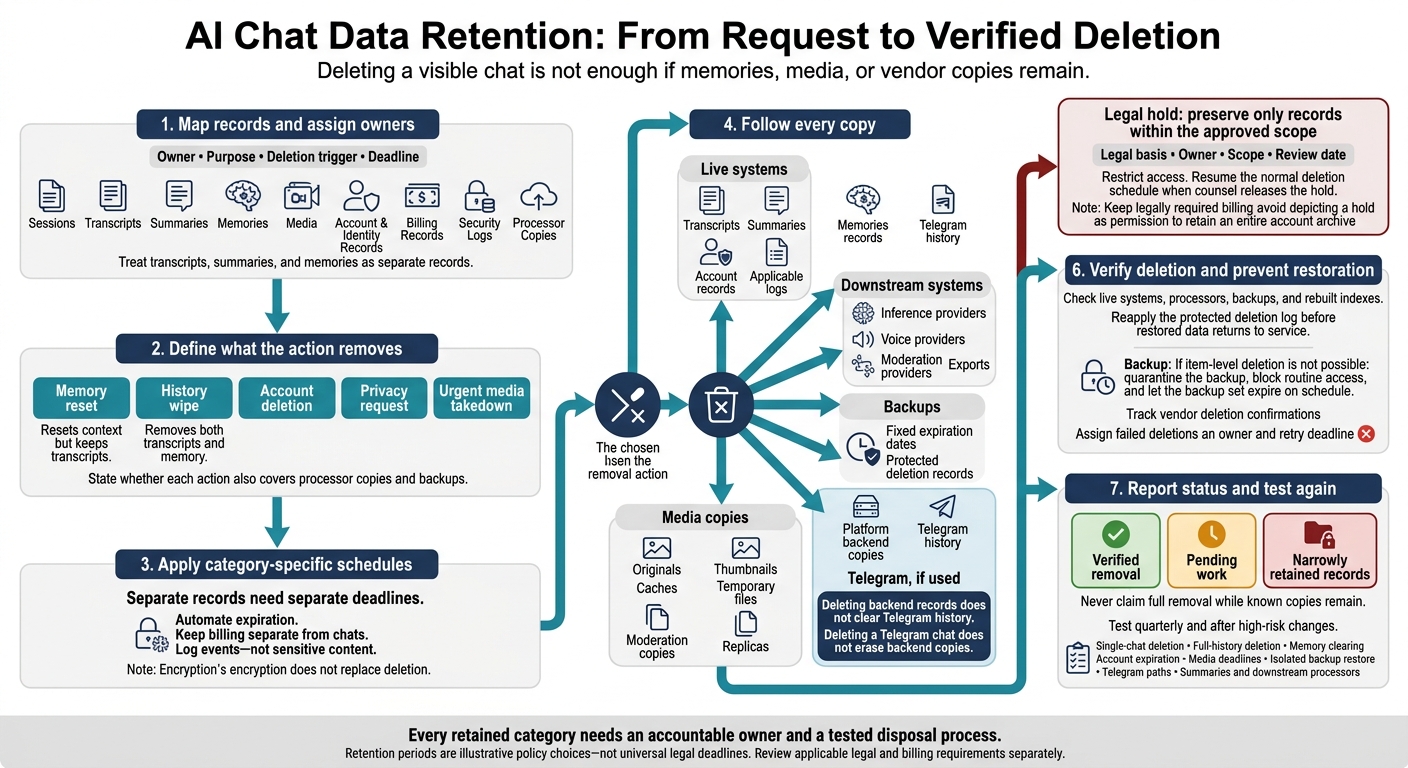
AI Chat Data Retention: From Request to Verified Deletion
What ChatGPT Knows About You (And How To Delete It)
sbb-itb-97c8eab
Define Data Categories and Deletion Triggers
Use the inventory above to give each data type an owner, purpose, deletion trigger, and deadline. Treat transcripts, summaries, and memories as separate records: deleting one does not delete the others. Track copies held by processors, too - not just records users can see in their accounts.
The periods below are illustrative policy choices, not statutory deadlines. Review applicable legal and billing requirements separately before setting those schedules.
| Category | Owner | Purpose and deletion trigger |
|---|---|---|
| Chats, summaries, and memories | Product team | Conversation continuity; delete within 30 days of a user deletion request or account closure. |
| Telegram data, if used | Integration owner | Messaging delivery; document which stored copies an unlinking or deletion request removes. |
| Images, videos, and voice data | Media/IT team | Media access; expire videos 90 days after creation and saved images 365 days after creation. Set a separate deadline for voice data. |
| Account and identity records | Compliance team | Access management and age checks; begin review and erasure at account closure, with a 30-day review period. |
| Payment references and transaction history | Finance team | Billing and recordkeeping; delete when the accounting or legal retention requirement ends. |
| Security and access logs | Security/IT team | Incident investigation; delete logs after 90–180 days. |
| Processor copies | Platform processor-management owner | Processing, voice generation, or moderation; delete after task completion under the processor’s terms. |
| Deletion, takedown, and legal-request records | Legal/Compliance team | Request handling and compliance; review for deletion when the case closes or the hold ends. |
Deletion, pseudonymization, and anonymization do different things. Deletion removes records, subject to disclosed backup and legal exceptions. Pseudonymization replaces identifiers but keeps a way to link the data back to a person. Anonymization must break that link; removing a username alone is not enough.
Use precise names for controls. A memory reset resets context but keeps transcripts. A history wipe removes both transcripts and memory. For each action, state whether it also covers processor copies and backups.
Write deadlines in a precise format, such as October 5, 2026, 11:59 PM UTC.
1. Set Expiration Dates for Webchat Logs
Start by applying the retention table to webchat logs. Live session state, transcripts, summaries, and analytics each need their own deadline.
Minimum Data and Purpose
Use pseudonymous session IDs for analytics and security. Keep transcripts separate from memory so users can clear their context without deleting their history.
Retention Period and Deletion Trigger
Keep flagged messages only until review and required enforcement are complete. Retain identifiable analytics only for the analysis window.
Expire active session state after two hours of inactivity, and automate expiration for stored chats and summaries separately. After a session expires, allow access to remaining records only for support, security, or legal review.
Access and Audit Controls
Limit access to documented support, security, or legal tasks. Log every privileged access, and encrypt the logs both in transit and at rest.
Deletion Across Copies and Exceptions
Apply expiration to every stored copy, including inference and moderation copies - not just the chat history users can see. Document processor retention terms separately for prompts and media. When a legal hold applies, isolate only the required records rather than freezing the entire archive.
Use this same copy-by-copy approach for media, billing, and backup records in the next rules.
2. Manage Telegram Data Deletion Separately
If users move adult chats into Telegram, your retention policy must cover copies held by Telegram, not just your backend. Telegram stores cloud chats on its servers. Secret Chats are device-specific, end-to-end encrypted, and unavailable to bots. Treat bot traffic as cloud messaging - not Secret Chat.
Minimum Data and Purpose
Document every field the integration stores, including messages, media, memory notes, Telegram IDs, and metadata. Explain why you need each field. Keep session IDs separate from sensitive preferences and limits.
Retention Period and Deletion Trigger
Set a retention deadline and deletion trigger for each category of copied data. Use separate triggers for clearing memory, deleting a chat, and closing an account. Specify which records each action removes. Deleting backend records does not clear Telegram history.
Access and Audit Controls
Document every Telegram-derived field that staff roles and external processors can access, including prompts, voice data, and memory notes. Record processor retention periods and maintain access logs for that content.
Deletion Across Copies and Exceptions
Deleting a Telegram chat does not erase backend copies. Deleting backend records does not erase Telegram history. Explain these two deletion steps separately.
Track deletion of vendor copies, record when backups expire, and identify the specific records whose deletion a legal hold delays. Map deletion copy by copy for media, billing, and backup records, too.
3. Encrypt Media and Set Deletion Deadlines
Minimum Data and Purpose
For media shared through Telegram or stored in chat, apply retention rules to the file itself, not just the conversation. Files can remain in galleries, caches, thumbnails, and backups after a chat ends.
Store each media type only for user galleries, chat continuity, or moderation. Give moderation copies their own retention schedule.
Retention Period and Deletion Trigger
Set automatic deletion dates for each media type, including user-saved files. Don’t keep everything for the life of the account. History wipes and account deletion should remove the associated media - not just links to it in chat.
Access and Audit Controls
Encrypt media in transit and at rest. Limit access to stored media to authorized staff, and log views and downloads. If selected content has PIN protection, clearly state that the PIN does not protect media or moderation copies.
Deletion Across Copies and Exceptions
Check that deletion removes originals, derivatives, caches, temporary files, and replicas. Record when backups expire, and prevent restore jobs from bringing deleted media back. For legal holds, preserve only the specific material covered by the hold, limit access, and document when the hold ends.
Keep media deletion deadlines separate from those for account and identity records.
4. Keep Only Needed Account and Identity Records
After setting retention rules for chats and media, trim the account file to what login, age checks, and compliance require. Treat preferences as user settings, not identity records.
Minimum Data and Purpose
Keep only authentication IDs, consent records, and 18+ verification status and timestamp. Use an age-verification provider to confirm eligibility without keeping copies of IDs. Limit support records to the details needed to resolve the request. Let users edit their limits, safe words, and memory notes.
Retention Period and Deletion Trigger
Keep active-account records separate from legal or compliance records held after account closure. Document why each retained field must stay. Users should be able to edit preferences and reset memory without closing their accounts.
Access and Audit Controls
Use role-based access so support staff see only the account details needed for their task. Log access to identity records. Store preference notes separately from core identity records, and give those notes their own access controls.
Deletion Across Copies and Exceptions
Check that account deletion covers internal systems and vendors that hold account or preference data. Track deletion through completion. Every legal exception must specify which records stay, the obligation requiring retention, and the end date.
Keep billing records in a separate file; the next rule covers payment data.
5. Keep Billing Records Separate From Chats
Minimum Data and Purpose
Billing records can identify a user even after their chats are deleted. Store only transaction IDs and processor tokens. Keep invoices, refund logs, disputes, and fraud records needed for review outside the chat database. Use a separate billing identifier so payment records don’t directly expose conversations or media.
Retention Period and Deletion Trigger
Set a retention schedule for each record type without extending chat retention. A seven-year invoice policy is a planning choice - not a universal U.S. rule. Set separate deadlines for refund and dispute records. Delete payment tokens when billing no longer needs them, and give fraud records a set review date and expiration date.
Access and Audit Controls
Let Finance view transaction metadata and refund status, but block access to chat and media tables. Record every finance administrator’s access in a tamper-resistant audit log.
Deletion Across Copies and Exceptions
Track deletion across billing databases, processor-held data, and backups. Record which copies are still waiting to expire. For tax, audit, or dispute holds, keep only the billing records tied to the hold, and document the reason and retention deadline. Tell users what remains after account deletion without keeping conversation content alongside those records.
Keep billing records separate from system logs, which should never record chat or payment content. Next, keep sensitive content out of system logs.
6. Keep Sensitive Content Out of System Logs
After separating chats, media, and billing, keep sensitive content out of logs, too.
Minimum Data and Purpose
Log events, not content. Exclude passwords, session tokens, payment details, intimate messages, and media URLs. Filter fields before logs reach storage or monitoring tools.
For troubleshooting, log event types such as
SessionStartedorMediaGeneratedwith pseudonymous session IDs.
Then give each log type its own deletion schedule.
Retention Period and Deletion Trigger
Set separate expiration dates for security and performance logs. Keep performance logs on a shorter, documented schedule, and retain security logs only as long as investigations require. Automate deletion for each category.
Access and Audit Controls
Restrict log access by role. Record privileged access in an audit trail, including the action and the administrator responsible - without copying sensitive content.
Deletion Across Copies and Exceptions
Delete logs copy by copy: expire records in the primary store, exports, monitoring tools, and downstream systems. If sensitive content enters a log, remove accessible copies and track when backups expire.
Keep logs under a legal hold separate. Document why they must be retained, and verify deletion when the hold ends.
7. Expire Backups and Remove Downstream Copies
Deleted data can linger in backups and downstream copies after it’s gone from live systems.
Minimum Data and Purpose
Map backups, restore paths, and downstream copies. Keep live sensitive data out of development systems. Use synthetic chats and media instead.
Retention Period and Deletion Trigger
Give each encrypted backup set a fixed expiration date. Apply that same deadline to replicas, indexes, exports, and vendor copies.
Access and Audit Controls
Limit restores to recovery roles, and isolate restored data until it passes deletion checks. Log every restore and verification. The logs must show that restores were checked - not just performed.
Deletion Across Copies and Exceptions
Maintain a protected deletion log containing only the identifiers and timestamps needed to enforce and review deletion. Before restored data returns to service, reapply the log to remove expired records and verify rebuilt search indexes.
The log supports deletion, not continued access to content. Keep it long enough to cover every backup that could bring deleted data back. Preserve only records covered by a current, narrowly scoped legal hold.
If item-level deletion isn’t possible, quarantine the backup, block routine access, and let the full backup set expire on schedule. Track vendor deletion confirmations separately.
8. Handle Deletion and Media Takedown Requests
Minimum Data and Purpose
Once you’ve defined retention for each copy, set out how users and third parties can request removal. Keep account deletion, privacy requests, and urgent takedowns on separate routes. Each should remove a different set of records.
Match identity checks to the request and keep verification records to a minimum. For urgent reports involving non-consensual imagery, real-person likenesses, or illegal material, collect only the message ID, URL, file path, or other exact location, plus the details needed for review. Don’t collect unrelated chats or identity documents by default.
Retention Period and Deletion Trigger
Start the retention clock when the request arrives. Handle urgent takedowns immediately, under a separate deadline. Keep privacy-request deadlines separate from internal account-deletion schedules.
Give deletion-request records an expiration date. Retain only the minimum proof of completion or records covered by a narrow hold.
Access and Audit Controls
Restrict access to verification records to staff handling removal or legal review. Store only the verification fields needed to process the request, and set an expiration date for them. Document each exception with its request ID, scope, and end date.
Deletion Across Copies and Exceptions
Remove affected chat logs, media files, processor copies, and backups. Send removal instructions to third-party processors that received prompts, context, or media, and track their responses.
Check what each external integration can delete, and explain what it cannot. Confirm the outcome to the requester, clearly separating verified removal, pending work, and narrowly retained records.
Confirm deletion across processors, then keep only the minimum record needed to prove completion or meet a narrow hold. Tie any hold to the specific request record - not the full account archive.
9. Keep Legal Holds Narrow
Minimum Data and Purpose
If a takedown request becomes a legal matter, create a narrow legal hold as an exception to standard deletion. Get counsel’s approval before preserving records. Document the legal basis, scope, date range, and minimum data categories needed. An informal demand should not lead to blanket retention.
Retention Period and Deletion Trigger
Give each hold an owner and a review date. Pause deletion only for records within the approved scope.
Access and Audit Controls
Maintain a chain-of-custody record that shows who collected, accessed, transferred, or changed the preserved records - and when. Limit access by role and log every action. A hold permits preservation only; it does not grant routine access to held records.
Deletion Across Copies and Exceptions
When the matter closes and counsel releases the hold, remove the flag and resume the normal deletion schedule. Verify disposal across live storage, backups, downstream copies, and separate session summaries. Document any records that must remain under a separate retention duty.
10. Test and Publish Your Retention Schedule
Minimum Data and Purpose
Turn the earlier retention rules into a schedule operators can publish and test. Name an owner for each data category, including records held by processors. Cover memories, summaries, and data sent to inference or moderation providers - not just visible transcripts. Use this schedule to put the rules above into practice.
Retention Period and Deletion Trigger
Label retention periods as illustrative only; not a current policy or universal legal requirement. Publish only deadlines the system can meet, and have counsel confirm legally required retention. Use a consistent format so each category is easy to scan, test, and audit.
| Data category | Minimum data | Illustrative period only | Deletion trigger | Exceptions to disclose |
|---|---|---|---|---|
| Chats and memory | Pseudonymized chat logs and saved context | 30-day grace period after a deletion request | History wipe or account deletion | Legal holds; backup expiration |
| Media | Synthetic files, prompts, and reference uploads | 365 days for images; 90 days for clips | Manual deletion or expiration | Backend safety copies before moderation |
| Account records | Email, age-verification status, and PIN-based access keys | Up to six years after account closure | Account closure or failed age verification | Fraud prevention and safety logs |
| Billing links | Transaction IDs and processor tokens | Seven years for required financial records | Subscription cancellation and audit completion | Tax and anti-money laundering laws |
| Takedown requests | Request logs and verification evidence | Retain only for the audit period required by counsel. | No deletion trigger; retained only as compliance evidence. | None |
Access and Audit Controls
Limit access to deletion evidence to compliance staff, and log every access. Verification records should include request IDs, timestamps, affected systems, results, and unresolved failures - not intimate chat excerpts. Give users a status confirmation without exposing internal security records.
Deletion Across Copies and Exceptions
After testing the schedule, verify that backups, vendors, and Telegram paths follow it. Test quarterly and after high-risk changes. Check single-chat deletion, full-history deletion, memory clearing, account expiration, and media deadlines.
Restore a backup in an isolated environment and confirm that deleted records cannot return to service. Test Telegram integrations separately where used. Include summaries and downstream processors in the same deletion test.
Publish backup deadlines, any backup recovery window, and third-party retention limits in plain language. Assign each failed deletion an owner and a retry deadline. Separate copies awaiting deletion from copies users hold; never claim full removal while known copies remain.
Conclusion: Assign Owners and Check Deletion
Once you’ve mapped every copy and deadline, assign an owner. Use the retention matrix as a control list, not a prompt to collect more data. Keep records only for a defined purpose, and tie each retention deadline to that purpose. If a feature doesn’t need saved chat history or media, don’t create those records.
Keep billing records separate from chats to reduce re-identification risk. Limit access by role, log every access, and use encryption to support deletion - not replace it. That separation matters most during deletion, not just storage.
Audit each deletion path: visible deletion is not complete deletion. Wiping a transcript can leave memories, summaries, and provider-side context intact. Give each its own disposal path, including backups. Apply the same rule to every retained record.
Have counsel define which records a legal hold preserves under the applicable retention rules. Every retained category needs an accountable owner and a tested disposal process.
FAQs
How can I verify that my data was deleted?
Check the platform’s Privacy Policy, content removal pages, and account management pages for deletion details. Reputable services provide tools in account settings that let you permanently delete chat history and account records yourself.
After you submit a deletion request, check your account dashboard for a confirmation notice or status update. Some platforms may temporarily keep backups or records they’re required by law to retain, even after your request.
What should I do if a deletion deadline is missed?
Contact AI Mistress right away through its dedicated content removal or reporting process to check your request’s status. Read the Privacy Policy and AI Safety Policy to understand how the platform handles your data.
If your request remains unresolved, escalate it through official support channels so your account and chat data are processed for permanent removal under the platform’s safety guidelines.
Which U.S. privacy rights apply to my chat data?
Your privacy rights depend on where the operator is based and which laws apply. These may include U.S. rules such as the CCPA, where applicable, and the EU’s GDPR.
An EU company operates AI Mistress and follows the data practices described on its privacy and legal pages. Check its privacy policy to see how it stores and processes your chat data.