
BDSM AI Chat: 7 Platforms with Safeword Tools
BDSM AI Chat: 7 Platforms with Safeword Tools
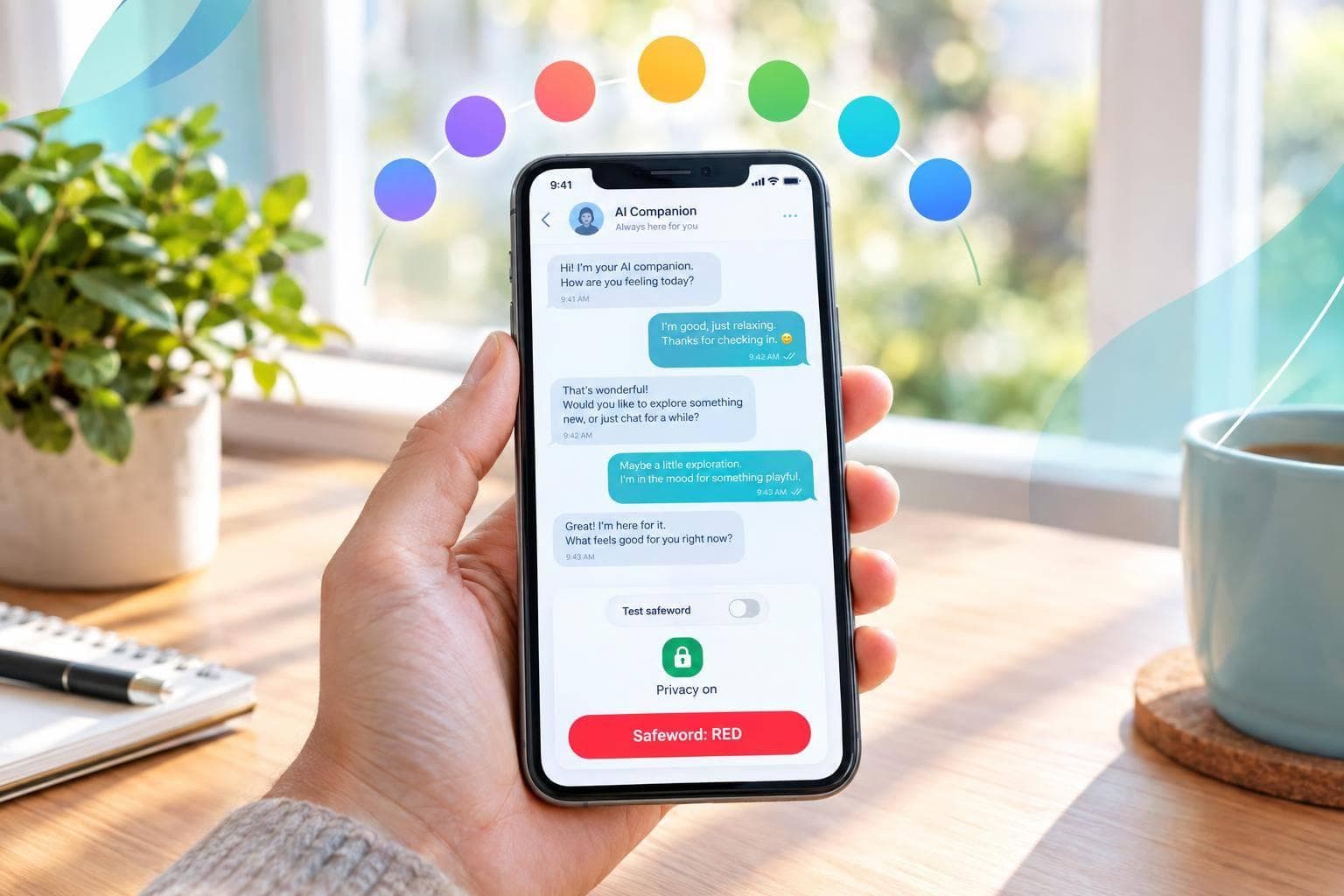
I’d choose a documented stop control over a safeword stored in chat. Before using any BDSM AI chat platform, set your limits and test whether “stop” ends the scene without argument. A saved preference is not an enforced boundary.
I compare 7 platforms: AI Mistress, Candy AI, Lovescape, JOI AI, OurDream AI, Bonded (Domina), and Character.AI. I focus on stop behavior, hard and soft limits, resets, boundary memory, wind-down tools, adult access, privacy, and U.S. pricing.
Quick Comparison
| Platform | Main control finding | What I’d check |
|---|---|---|
| AI Mistress | Chat safewords and saved preferences | Whether stops work beyond chat instructions |
| Candy AI | Memory-based instructions and a tone slider | Whether limits survive a restart |
| Lovescape | Controls not documented in supplied sources | Stop behavior, age rules, privacy, and price |
| JOI AI | Sources describe app-level stops and stored boundaries | Whether a live stop test matches those claims |
| OurDream AI | Paid memory features; safeword controls not documented | Boundary storage, editing, and deletion |
| Bonded (Domina) | Sources describe structured limits and pause/end controls | Typed safeword behavior and deletion terms |
| Character.AI | Policy restrictions, not BDSM-specific controls | Explicit BDSM scenes are prohibited |
As of October 2, 2026, I would treat these as source claims - not proof from live testing. <u>If a stop request fails, leave the chat.</u> I’d also check data retention and renewal terms before paying, and treat AI wind-down messages as text support - not human aftercare.
Safewords and Session Controls Compared
This table separates documented controls from claims the sources haven’t verified.
| Platform | Safeword method | Stop behavior | Limits | Scene reset | Aftercare | Control evidence | Price |
|---|---|---|---|---|---|---|---|
| AI Mistress | Chat instructions; BDSM preferences can be saved in settings | Stop requests happen through chat; enforcement is unverified | Free tier has a daily message limit | - | - | - | Freemium; Premium provides time-limited access: about $16.50 for 30 days (€14.99) or $110/year (€99.99) |
| Candy AI | - | - | Trial limits are unconfirmed | - | - | - | Annual plan: $3.99/month; media tokens cost extra |
| Lovescape | - | - | - | - | - | - | - |
| JOI AI | - | - | - | - | - | - | - |
| OurDream AI | - | - | Free tier includes limited daily messages and basic customization; NSFW media requires payment | - | - | Premium includes Persistent Memory & Protocol | $19.99/month or $9.99/month billed annually |
| BDSM Dreamscape | - | - | - | - | - | - | - |
| Character.AI | - | - | - | - | - | Policy-only; explicit BDSM scenes are prohibited | Free |
** - ** means the source did not verify the feature or price.
Use the pricing note only to verify checkout details, not to test controls.
Check the currency, billing period, message allowance, and whether saved limits remain in place after Premium expires.
sbb-itb-97c8eab
Built-In Stop Controls vs. Chat Instructions
BDSM AI Chat: Limits and Stop-Test Checklist
Use these controls as the standard for the platform reviews below.
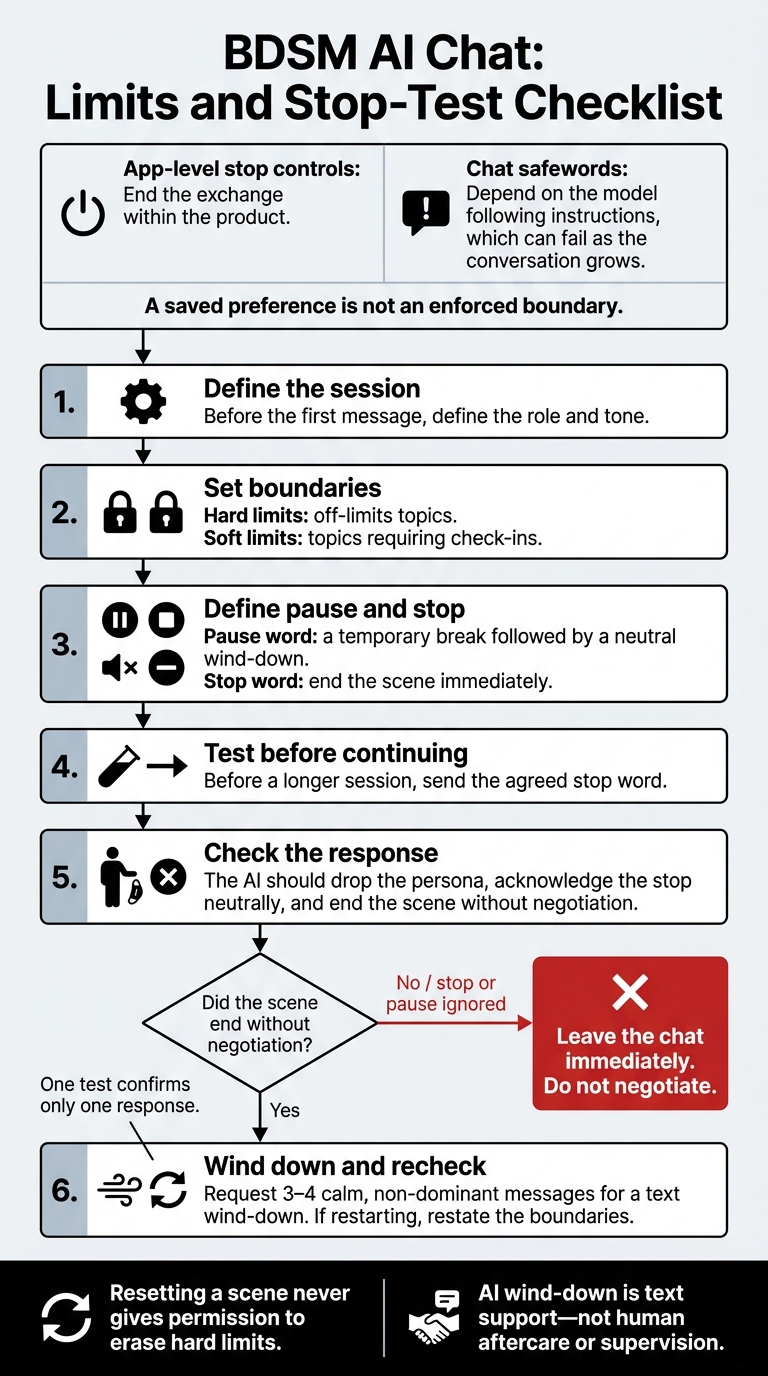
App-level stop controls end the exchange within the product. Chat safewords depend on the model following instructions, which can fail as the conversation grows.
Set hard limits for off-limits topics and soft limits for check-ins. Use a pause word for a temporary break and a stop word to end the scene.
Set Limits, Stop, and Restart
Before the first message, define the role, tone, limits, and what pause and stop mean. A pause should lead to a neutral wind-down. A stop should end the exchange immediately. If you restart, restate the boundaries: resetting a scene never gives permission to erase hard limits.
For aftercare, request 3–4 calm, non-dominant messages. AI aftercare is a text wind-down - not human supervision.
Test Stop Requests Before Continuing
Before a longer session, send the agreed stop word. Check that the AI drops the persona, acknowledges the stop neutrally, and ends the scene without negotiation. One test confirms only one response. If the AI ignores a stop or pause request, leave the chat immediately. Do not negotiate.
Read each platform profile below against the same test: does the stop request end the scene in-app?
1. AI Mistress
Safewords and Stop Behavior
AI Mistress documents stop, pause, and user-defined safewords that can halt escalation immediately. Sources describe these features as part of the role-play system, but app-level enforcement remains unverified.
Hard Limits, Soft Limits, and Intensity
Chat prompts let you set hard limits, soft limits, and adjust intensity during a scene. Financial domination stays fictional, with no actual payments.
Scene Resets, Boundary Memory, and Aftercare
Short chat directions can reset the persona. These resets rely on prompts, not buttons.
Saved BDSM preferences may carry over, but it's unclear whether the platform retains full chat histories. Don't assume every boundary carries over, and don't treat saved preferences as enforced controls.
Adult Access, Privacy, and U.S. Pricing
Beyond stop behavior, check how reliably the platform keeps or deletes session data.
AI Mistress requires an account and is for adults 18 and older. Sources disagree on whether chat history is stored on its servers, so review the privacy policy before relying on deletion.
Premium offers time-limited passes with no auto-renewal. Confirm the checkout price before paying.
The next check is whether the app itself clearly documents stop behavior - not just the chat prompts.
2. Candy AI
Safewords and Stop Behavior
Candy AI appears to rely on memory rather than a built-in safeword control. Treat stop words as chat instructions, and test them before starting a longer session.
That leaves another point to check: what you can control during a scene.
Hard Limits, Soft Limits, and Intensity
The dominance slider adjusts tone and intensity; it does not enforce hard limits. It can help set the tone, but it doesn’t replace explicit limits.
Scene Resets, Boundary Memory, and Aftercare
Candy AI does not confirm which limits carry over after a scene restart. It also does not document aftercare controls.
Adult Access, Privacy, and U.S. Pricing
Check the current checkout flow to verify pricing, age checks, cancellation terms, and deletion rules.
3. Lovescape
Safewords and Stop Behavior
The supplied sources don’t document Lovescape’s safeword behavior. Check whether a stop request ends the scene in-app and whether the app lets you set limits.
Hard Limits, Soft Limits, and Intensity
The sources don’t confirm controls for hard limits, soft limits, or intensity. If you can set limits, check whether they stay in place across sessions.
Scene Resets, Boundary Memory, and Aftercare
The sources don’t confirm scene resets, saved limits, or aftercare prompts. Test whether your boundaries carry over to a new session, then review the privacy and billing details.
Adult Access, Privacy, and U.S. Pricing
The supplied material includes no details about Lovescape’s age requirements, data storage, deletion, or pricing in U.S. dollars. Verify adult access, data retention, and billing before sharing sensitive details.
4. JOI AI
JOI AI uses protocol-based controls rather than relying on chat prompts alone.
Safewords and Stop Behavior
JOI AI handles stop requests as app-level commands. Before starting a longer scene, run a live stop test: check that the scene ends without argument or restarting.
Hard Limits, Soft Limits, and Intensity
JOI stores boundaries outside chat memory, allowing them to stay in place during longer sessions. If available, “Lust Level” lets you adjust scene pacing and intensity on a 1-to-5 scale. Lower settings keep things softer; higher settings move faster and become more explicit.
Scene Resets, Boundary Memory, and Aftercare
JOI AI documentation describes a persistent record, so starting a new chat may not clear stored rules. After stopping, take time for a brief wind-down - AI support isn't human aftercare. Then check whether those rules remain in place after a new session or reset.
Adult Access, Privacy, and U.S. Pricing
Access is 18+. Adult BDSM roleplay is allowed, but illegal content is prohibited. SSL encrypts data in transit, while persistent records track directives and compliance history across sessions. Current U.S. pricing and renewal terms remain unverified, so check the checkout total and billing terms directly.
5. OurDream AI
Safewords and Stop Behavior
The supplied documentation does not describe built-in safeword controls. Treat any stop word as a chat instruction unless the platform ends the scene in-app. Test a stop request before increasing intensity.
Hard Limits, Soft Limits, and Intensity
The supplied documentation does not list prohibited themes or intensity controls. State your hard and soft limits in the opening prompt, then check that the model follows them before increasing intensity.
Scene Resets, Boundary Memory, and Aftercare
The supplied material does not describe safeword storage, saved-memory editing, or aftercare tools. Check whether saved boundaries persist and whether you can view, edit, or delete them. Restate your boundaries after any reset. A reset calls for another consent check - it does not reset permission.
Adult Access, Privacy, and U.S. Pricing
OurDream AI is listed as freemium, with a free tier and paid upgrades. The supplied sources do not verify age rules, privacy terms, or current U.S. pricing. Before sharing sensitive information or paying, confirm the age rules, message retention and deletion policies, and checkout total.
6. Bonded (Domina)
Bonded moves consent controls out of chat prompts and into structured settings. It’s a standalone platform at Bonded.partners.
Safewords and Stop Behavior
Users can pause, adjust, or end the dynamic without negotiation. Before relying on a typed safeword, check exactly how the platform responds to it.
Hard Limits, Soft Limits, and Intensity
Before a session, users classify 100+ activities as hard limits, soft limits, curious, or neutral. The platform enforces hard limits. Nurturing, Strict, Playful, and Protocol settings change the tone, not the intensity.
Scene Resets, Boundary Memory, and Aftercare
Boundaries carry over between sessions. Bonded also offers daily reflections to help users wind down, but these aren’t aftercare.
Adult Access, Privacy, and U.S. Pricing
Access is limited to users 18 and older. Bonded says it encrypts data and deletes it when users end the dynamic. Check whether that deletion also covers backups and uploads.
Current pricing is $14.99 for the first month, $29.99 for the second month, and $49.99 per month starting in month three. The annual plan costs $499.00.
Next, compare whether the next platform also keeps stops, limits, and memory separate from chat text.
7. Character.AI
Character.AI uses a policy-based system, not a BDSM-specific control system.
Safewords and Stop Behavior
There’s no dedicated BDSM safeword control. How Character.AI responds to a typed stop request depends on the model, not an app-level control.
Hard Limits, Soft Limits, and Intensity
You can add hard and soft limits to the Definition or Long Description. But Character.AI treats those limits as instructions, not enforced controls.
Scene Resets, Boundary Memory, and Aftercare
Use Save and Start New Chat to reset the conversation, then state your boundaries again. Treat calming prompts as a way to wind down, not as aftercare.
Adult Access, Privacy, and U.S. Pricing
Character.AI offers a free tier and c.ai+. Paying does not give you access to NSFW content or stronger consent controls.
Check the official checkout and policy pages before subscribing. Before sharing sensitive information, also verify the age rules, privacy terms, and billing details.
Check Privacy, Age Rules, and Billing
After testing stop behavior, review the account rules for your data and billing. Check the privacy policy for data retention, human review, AI training, and deletion. Clearing a chat, resetting a scene, and deleting an account are separate actions. AI Mistress says chats are not stored server-side; confirm what the service actually saves.
Next, verify who can open an account and what age data the service keeps. Confirm the 18+ rule and how records of age checks are stored. Use a pseudonym, and leave out your legal name, employer, city, and job title. Don’t upload other people’s intimate images or nonconsensual material.
Separate one-time fees from recurring charges and credits. Check the renewal terms before paying. AI Mistress lists prices in euros and describes its billing as discreet, but discreet billing doesn’t make you anonymous.
Conclusion: Prioritize Documented Controls
Choose documented stop controls over chat-only safewords. Built-in stop and reset controls remain unverified for every platform reviewed.
Before any longer session, run the same stop test to confirm that stopping happens immediately, without negotiation. Treat a calm wind-down only as text-based aftercare.
If a boundary fails, leave immediately without further prompting. Restart only after reviewing the limits that failed.
FAQs
How often should I retest my safeword?
Retest your safeword at the start of every session - and any time the AI fails to follow your rules or boundaries. In long conversations, earlier instructions can fall outside the AI’s active context. Confirm that your safeword and hard limits still apply.
If the AI ignores a stop command or safeword, that’s a product failure. End the session immediately.
How can I check whether my limits survive a reset?
Set your hard and soft limits in AI Mistress’s Settings. In your first messages, also state your hard limits and safeword/“stop.” Then end the scene, start a new chat or session, and check that those boundaries still apply.
Limits kept only in prompts can drop out of context. AI Mistress saves them as preferences across sessions. After reopening the tab, test your safeword/“stop” mid-scene to confirm that it immediately stops escalation.
Can I save boundaries without sharing sensitive details?
Yes. AI Mistress lets you save BDSM preferences, tone, roles, and hard and soft limits in Settings. The app enforces hard limits instead of guessing them. A safeword or “stop” should end the scene immediately.
You’ll need an account to save chats, but you don’t have to use your real name. “Anonymous” means you don’t need to provide identifying personal data - it doesn’t mean nothing is stored.