
AI Fetish Messaging: Ultimate Privacy Guide
AI Fetish Messaging: Ultimate Privacy Guide
I treat AI fetish chats as records that could be linked to me - not as private by default. Before sending anything, I check storage and training rules, use fictional details, and secure my account with a passkey or a separate password of at least 15 characters, plus MFA.
For adults 18 and older, my privacy checklist covers:
- The service: Who can read chats, which providers receive them, and what stays after deletion.
- The device: Notifications, browser history, downloads, tracking, and backups.
- The conversation: Fictional adult characters, clear limits, a stop command, and no identifying uploads.
- The exit plan: Steps for leaks or threats, subscription cancellation, and account and data deletion.
My rule: <u>share less, even when security settings look good.</u> Encryption, private browsing, and payment don’t promise anonymity - and deleting visible chats may leave other copies behind.
AI Chatbots & Your Privacy: What Are You Sharing? | Aura’s Thomas Clayton
sbb-itb-97c8eab
Review Access Options and Data Policies
Start with the access method and policy text. That’s where the service sets its storage, sharing, and deletion rules.
AI Mistress uses Webchat for AI roleplay. Before registering, read the current privacy policy, terms, cookie notice, and deletion instructions. Save the policy date, and compare public claims with the policy text - especially for logs, backups, training, and deletion.
Its public page describes encryption in transit and says it does not store personal data or chat histories. Its privacy policy separately describes account information, interactions, cookies, analytics, processors, and retention. Ask what the no-storage claim excludes, including logs, backups, identifiers, and processor records. Request specific retention periods.
Webchat, Messaging Integrations, Local AI, and Private Browsing
Each access method changes where your messages may be stored, including outside the service itself. Use this table as a set of privacy checks, not a list of promised features.
| Access option | Privacy benefit | Exposure risks | Controls and checks |
|---|---|---|---|
| Webchat | Avoids installing an app. | Server records, cookies, identifiers, and processors can expose activity. | Check history controls and which providers receive prompts. |
| Messaging integrations | May offer familiar account controls. | The host platform may retain messages, metadata, notifications, and backups. | Verify full-path end-to-end encryption, retention, and separate options for disconnection and deletion. |
| Local AI | Reduces cloud exposure when data stays on-device. | Telemetry, cloud APIs, synced files, backups, and device access can expose data. | Inspect API use, logs, and storage. Then test with networking blocked while monitoring connection attempts. |
| Private browsing | Limits local history and session cookies after closing. | Services and network observers can still see activity; downloads may remain. | Close all private windows and review downloads. |
Private browsing is a browser mode, not an AI tool or a provider-side privacy control.
Check Data Storage, Training, Billing, and Deletion
Before signing up, check which identity-linked data the service collects, stores, shares, and deletes. This includes your email, username, age-verification information, IP address, device identifiers, location, uploads, and chats. Choose the least identifying access the service allows, but never bypass age checks.
Check retention periods for transcripts, summaries, memories, and backups, along with staff and contractor access. Review training defaults and opt-outs, including whether they cover previously collected data. Check advertising and analytics uses and identify the hosting, AI, moderation, verification, and integration providers involved. Note how you’ll receive breach notices and whether you can view active sessions.
Before paying or sharing sensitive content, confirm the statement descriptor, receipt sender, payment processor, and payment information kept on file. Check taxes, refunds, and whether charges recur or cover a fixed period. Payment does not ensure anonymity.
Ask whether deletion covers chats, memories, attachments, identifiers, support records, backups, and processor copies - not just visible history. Get a deletion timeline and details about any legal-retention exceptions. U.S. privacy rights vary by state and circumstance. Intimate chats are not automatically protected by HIPAA, which generally covers specified healthcare entities and their business associates, not ordinary consumer entertainment services.
Protect Your Accounts and Devices
After reviewing the policy, secure the account and device you’ll use for chats. If either is compromised, someone could access your session history, saved media, and recovery channels.
Use a separate email address that doesn’t identify you. Avoid usernames, profile photos, and recovery details linked to your real identity. Use a password manager with autofill to generate a random password of at least 15 characters. Secure the manager with a strong master passphrase and MFA. Don’t reuse that password for email, payment, social media, or any other account. Before you start, review privacy, notification, and data-sharing settings.
Choose a passkey or hardware security key when available. Otherwise, use an authenticator app rather than SMS. Passkeys and security keys resist phishing; SMS codes can be exposed through phone-number takeover or interception.
Keep recovery codes offline in a locked, private location - not in screenshots, downloads, chat messages, or an unencrypted cloud folder. Reject login prompts you didn’t trigger. These steps reduce the risk of someone accessing your account without permission, but none guarantees privacy or anonymity.
Encryption and Security Terms Explained
These terms can help you understand what security settings do - and what they don’t.
| Term | Plain-language meaning | Practical check |
|---|---|---|
| Encryption in transit | Protects data as it moves between your device and the service. | Check for HTTPS and the exact official domain. Don’t ignore certificate warnings. |
| Encryption at rest | Protects data stored on servers or devices. | Ask whether it covers logs and backups, and who controls the keys. |
| End-to-end encryption (E2EE) | Only designated endpoints should be able to decrypt the content. | Ask where AI processing happens and who can access decrypted content. |
| Metadata | Conversation details, such as time, IP address, device, account, recipient, or file size. | Check which details are logged and how long they’re kept. |
| Data retention | How long data is stored. | Check exact deadlines, including those for backups. |
| Training use | Using chats to improve models. | Check whether opting out also covers past chats. |
| MFA | A login that requires two or more factors. | Turn it on and secure its recovery methods. |
| Phishing | Fake messages or websites that steal credentials or codes. | Open the official site directly instead of following unexpected login links. |
| Data deletion | Removal of stored data. | Ask what remains and when backups expire. |
An E2EE label doesn’t prevent provider access if content is decrypted for AI processing, moderation, or human review.
Control Notifications, Device Access, and Tracking
Close off easy ways for chats to appear on your device. Disable lock-screen notification previews for the AI service, email, password manager, and payment apps. If the sender’s name would reveal your activity, turn those notifications off entirely.
Avoid shared, borrowed, or work-managed devices. Review browser sync, cloud backups, recovery email addresses and phone numbers, downloads, and screenshots for possible chat exposure. Check active sessions, connected accounts, browser extensions, and sharing settings. Revoke access for anything unfamiliar.
Use a strong device lock, enable automatic locking, and keep your operating system, browser, password manager, and security software updated.
On public Wi-Fi, verify the network name and the site’s exact official HTTPS domain. A VPN can reduce what the network operator sees, but it won’t hide messages from the service or anyone who can unlock your device.
Share Less and Set Roleplay Limits
Once your account is secured, limit what your conversations reveal. Treat AI fetish messaging as adult roleplay: every message can be stored, reviewed, copied, or exposed. Keep your identity, contact details, payments, and uploads out of the scene.
Use Fictional Details and Limit Uploads
Use made-up names, jobs, locations, and relationship histories. Keep those details consistent throughout the chat, and remember that unusual combinations can identify you. Never share passwords, codes, government IDs, financial details, medical records, exact addresses, or someone else’s private information.
Stick to text when possible. Avoid photos, voice notes, and documents that reveal faces, tattoos, badges, visible mail, or other identifying details. Removing metadata doesn’t hide identifying content or prevent screenshots, copies, or provider storage.
Keep Roleplay Adult and Set Stop Commands
Make every character fictional and clearly 18 or older. End the interaction if underage themes appear or anyone’s age becomes unclear. Before you start, agree on forbidden themes, intensity limits, and a stop command such as:
“END SCENE.”
State that this command ends the scene immediately and blocks requests for personal details or images. If the AI ignores it, close the session and report the behavior. Save only what you need for the report.
AI output cannot consent for real people. It cannot authorize the use of their images, voices, or private stories. Once shared, those materials could be exposed or reused. Keep roleplay separate from medical, legal, financial, and crisis issues, and turn to qualified human help for those needs. Weak policies, stored copies, or account misuse can expose information even when you share carefully.
Spot Privacy Risks and Handle Exposure
When policy wording or user behavior seems off, move from review to protection.
Watch for Vague Policies and Suspicious Requests
Pause if a policy doesn't explain retention, training, access, or deletion - or makes transcripts publicly searchable by default. Look for documented encryption of stored data, limits and logs on staff access, and recent security audits or independent testing. Privacy badges alone aren't enough. Missing details don't prove a breach, but they're a reason to share less. If the concern involves active access, go straight to protecting your account.
Verify requests by opening the official site yourself. A legitimate age check explains its purpose, what it collects, who processes it, and how long the information is kept. Treat any ID request through ordinary chat as suspicious. Don't install an extension or remote-access software to continue a chat or verify your age.
Respond to Account Breaches, Leaks, and Extortion
If exposure is already happening, protect your account first. If you suspect a breach, stop the session immediately. Use a trusted device and type the official domain yourself. Secure the email account linked to the service, change affected or reused passwords, revoke sessions, remove unfamiliar connected apps, and enable MFA. Delete unknown recovery methods and check email forwarding rules. When available, choose phishing-resistant authentication, such as a security key.
Save only the evidence needed to report the exposure: account identifiers, threat messages, timestamps, URLs, payment records, and suspicious login details. Store it privately with restricted access rather than reposting it. Contact support through its published channel and request removal of exposed chats or uploads. Don't attach more intimate material than needed.
For extortion, don't pay; payment often leads to more demands. Keep only the evidence needed for a report and report threats to FBI IC3. An old password doesn't prove webcam access. Replace it and any reused passwords without clicking the sender's links. If suspected material involves a minor, don't download or forward it; report it to law enforcement or NCMEC’s CyberTipline. Call 911 for immediate danger.
Manage Stored Data and Close Accounts
AI Chat Privacy: Cancel Billing and Delete Your Data
After securing access, clean up the data the service and your devices still hold.
Review Sessions, Connected Accounts, and Saved Files
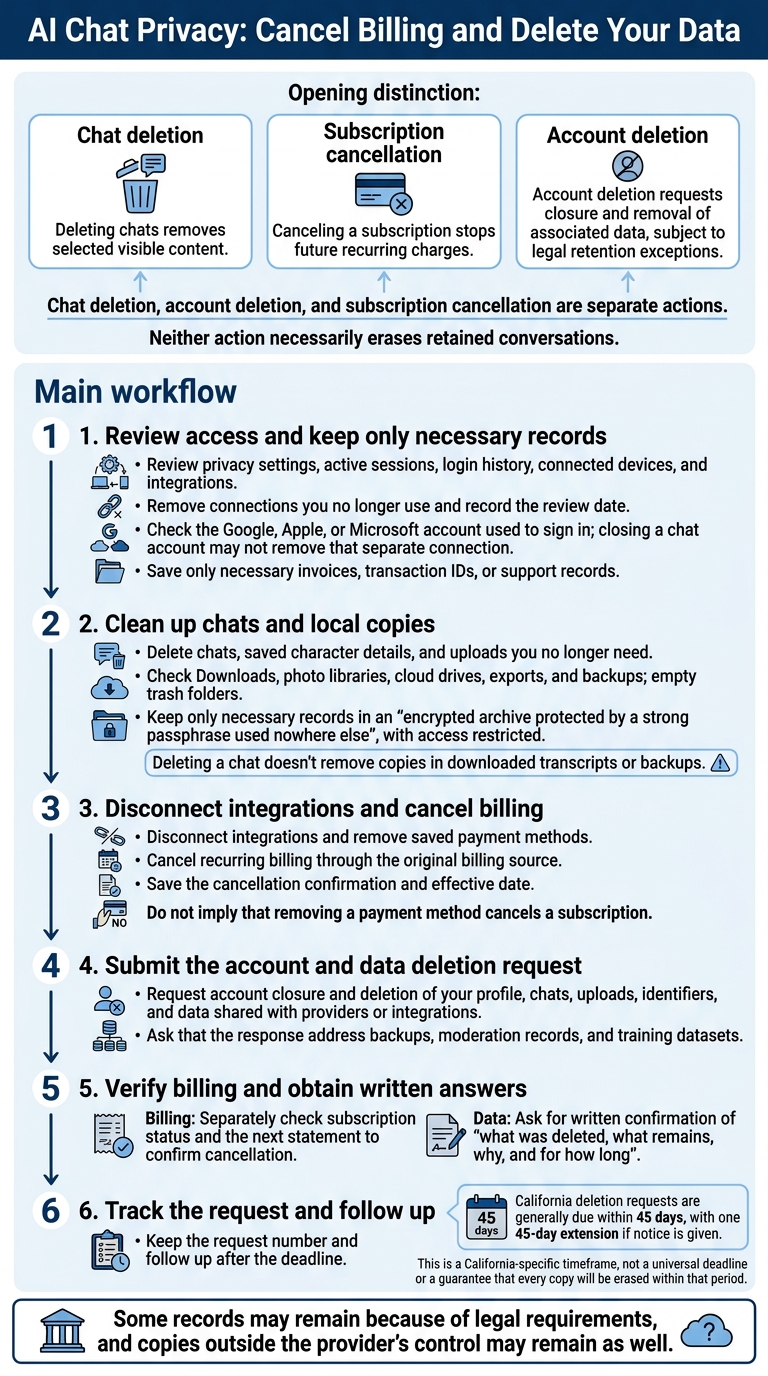
Review your privacy settings regularly, along with active sessions, login history, connected devices, and integrations. Remove connections you no longer use, and record the review date. Check the Google, Apple, or Microsoft account you used to sign in, too: closing a chat account may not remove that separate connection.
Delete chats, saved character details, and uploads you no longer need. Then check Downloads, photo libraries, cloud drives, exports, and backups, and empty trash folders. Keep only necessary records in an encrypted archive protected by a strong passphrase used nowhere else, with access restricted. Deleting a chat doesn’t remove copies in downloaded transcripts or backups.
With old copies removed, address account closure and billing.
Cancel Subscriptions and Request Data Deletion
Chat deletion, account deletion, and subscription cancellation are separate actions. Deleting chats removes selected visible content. Canceling a subscription stops future recurring charges. Neither action necessarily erases retained conversations. Account deletion requests closure and removal of associated data, subject to legal retention exceptions.
Before closing the account, save only necessary invoices, transaction IDs, or support records. Delete chats and uploads, disconnect integrations, remove saved payment methods, and cancel recurring billing through the original billing source. Save the cancellation confirmation and effective date, then submit your account deletion request. Separately check your subscription status and next statement to confirm cancellation.
Request deletion of your profile, chats, uploads, identifiers, and data shared with providers or integrations. Ask for written confirmation of what was deleted, what remains, why, and for how long. This should cover backups, moderation records, and training datasets. Some records may remain because of legal requirements, and copies outside the provider’s control may remain as well. California deletion requests are generally due within 45 days, with one 45-day extension if notice is given. Keep the request number and follow up after the deadline.
Conclusion: Check Before You Send
AI fetish messaging calls for a privacy check before every send, not afterward. Keep checking policies, limit identifying details, and make every scene fictional, adult, consensual, and subject to a stop command.
Before sending anything, work through these five checks.
Run a 5-Point Privacy Check
- Identity: Could the content identify you or someone else? Remove names, usernames, contact details, workplaces, schools, locations, dates, and one-of-a-kind events.
- Access and storage: Check who can access chats, how long they’re stored, whether they’re used to train models, whether humans can review them, and what remains after deletion. If the documentation leaves gaps, don’t share highly sensitive content.
- Account security: Use a password you don’t use elsewhere or a passkey, and turn on MFA. Secure your recovery email and backup codes, review active sessions, and remove unfamiliar devices.
- Devices and sharing: Check notifications, downloads, backups, browser history, permissions, and integrations. Review what stays stored after the conversation ends.
- Exposure risk: Would you still send it if someone copied it or linked it to you? If not, rewrite it or don’t send it.
Controls can reduce risk, but they don’t guarantee anonymity or deletion.
FAQs
How can I verify a chat service’s privacy claims?
Check what the service collects, including your email, IP address, device data, chats, media, and billing information. Look for clear retention limits and deletion controls, plus an explanation of what happens to backups after you delete your account.
SSL/HTTPS doesn’t mean end-to-end encryption. Check what’s encrypted and who can read your prompts once they leave your device. Review the privacy and consent settings to find out whether your chats may be used to improve the model.
Can fictional chat details still identify me?
Yes. Even in roleplay, details like your city, employer, partner’s name, or specific kink details can be combined to identify you. Platforms may keep this information in memory or logs and connect it to your billing records or email - even if your account seems anonymous.
Keep personal identifiers out of your prompts, including real names and addresses. Use a dedicated email address for your account.
What if my data deletion request is ignored?
Check the service’s privacy policy to see how it retains and deletes data, then find a channel for reporting concerns or escalating requests. If the service doesn’t respond or gives unclear answers about your rights, assume it may still have access to your information.
AI Mistress follows a no-chat-history policy: it does not store sessions on its servers, so there’s no persistent session data to recover or delete.