
AI BDSM Chatbots: 5 Customization Features Compared
AI BDSM Chatbots: 5 Customization Features Compared
I’d choose an AI BDSM chatbot by what I can change - not what it promises. Of the 3 options compared here, Kindroid has the clearest documented memory and reply controls. AI Mistress offers themed characters and custom settings, while Nomi centers on saved context. None has a verified, guaranteed stop control in the sources reviewed.
I compare AI Mistress, Kindroid, and Nomi across 5 settings: persona, tone, memory, boundaries, and editing tools. For adult, fictional role-play, my first checks are simple: Can I change my limits, correct a reply, and delete saved information?
Quick Comparison
| Control | AI Mistress | Kindroid | Nomi |
|---|---|---|---|
| Persona | Presets and custom characters | Backstory and character instructions | Backstory+ and Shared Notes |
| Tone | Saved preferences and chat instructions | Directives and example messages | Backstory+ and chat instructions |
| Memory | Preferences and chat history; memory tools unclear | Editable memory tools; some require a subscription | Editable notes; Identity Core not directly editable |
| Boundaries | Written limits and stop instructions | Limits in character instructions | Written limits; field described by a third-party source |
| Editing | Chat corrections or character changes | Regenerate, edit last user message, Chat Break | Chat corrections and note updates |
My rule: <u>correcting a reply is not the same as deleting stored data</u>. I’d check retention and deletion terms before sharing sensitive details - and treat written limits as instructions, not guarantees.
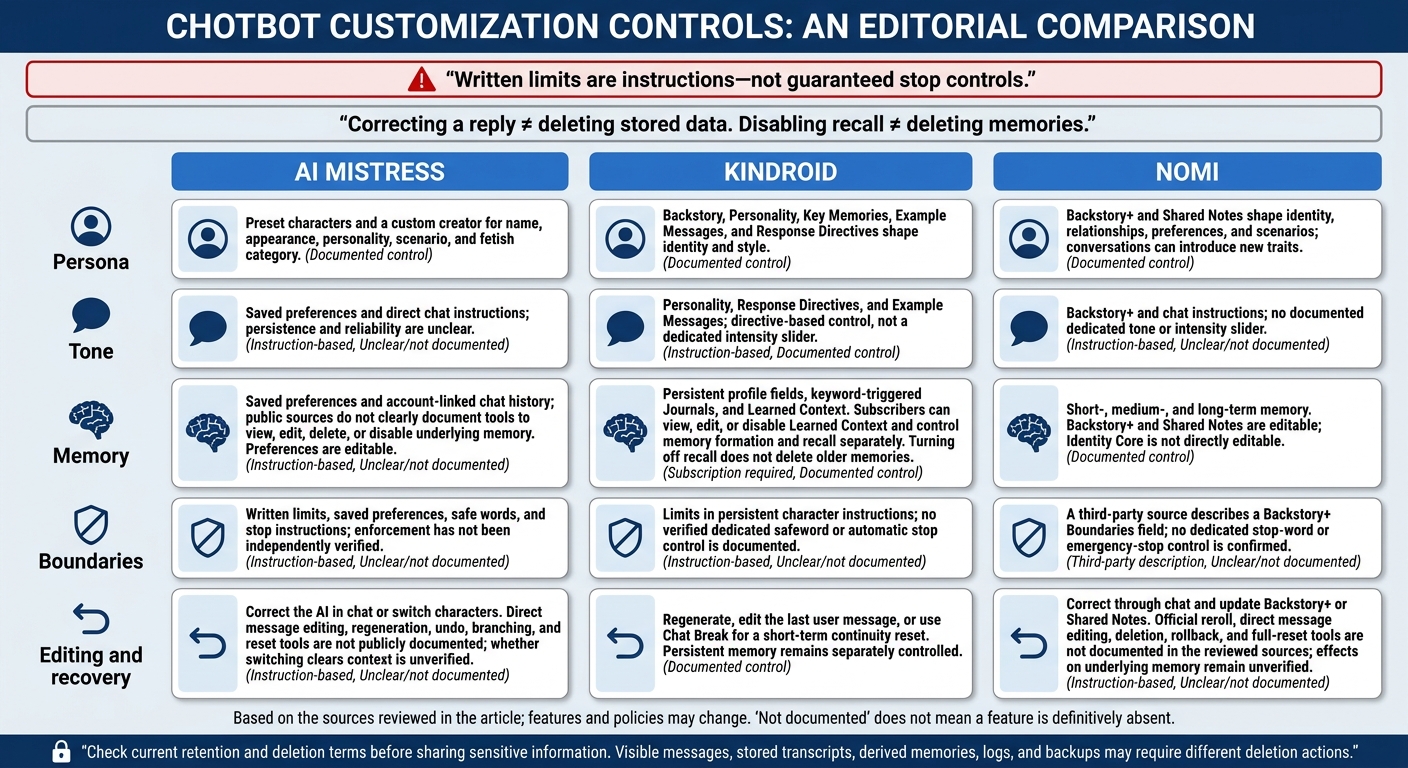
AI BDSM Chatbots: 5 Customization Controls Compared
1. AI Mistress
AI Mistress focuses on domination roleplay, offering multiple AI Mistresses with different tones and roles. User control comes down to persona settings, tone instructions, memory, boundaries, and tools for correcting the chat.
Persona and Tone Controls
AI Mistress says users can pick preset characters or use a custom creator to set a name, appearance, personality, scenario, and fetish category.
Users can guide the tone with direct instructions in chat. Vague requests tend to be less reliable. What carries over between replies and sessions is less clear.
Memory Control
AI Mistress says users can save standing BDSM preferences in Settings, and chat history stays tied to their account. But saved preferences and chat history aren't the same as editable memory. Public sources don't specify which memories users can view, edit, delete, or limit. With those controls unclear, setting limits becomes the main way to keep a scene on track.
Boundary Enforcement
Users are told to set hard limits, soft limits, and a safe word before play. Stop and pause are described as commands that should end escalation, but their enforcement hasn't been independently verified. If a command fails, the documented fallback is to correct the AI manually or switch characters.
Editing and Recovery
When the AI drifts, users can correct it in chat or change characters. Public sources don't document message editing, regeneration, undo, branching, or reset tools. A correction may change the next reply, but it doesn't show that earlier messages or stored information have been changed or deleted.
sbb-itb-97c8eab
2. Kindroid
Kindroid lets users build a Kin with a name, personality, backstory, appearance, and voice. Profile data and conversation memory help keep interactions consistent. The customizable companion platform also supports consensual adult role-play. Available policy summaries describe it as 18+ and permissive about fictional adult role-play, while prohibiting sexualized minors and real-world harm.
The key question is how much control users retain once a chat starts.
Persona and Tone Controls
Backstory and Personality shape the Kin’s identity, history, mood, behavior, relationship, and speaking style. Example Messages show the preferred dialogue pattern and voice. Response Directives give higher-priority behavioral guidance, though the documentation confirms directive-based control - not a dedicated intensity slider. These settings only help if the model follows them consistently across replies.
Memory Control
Backstory and Key Memories store persistent details, while Journal entries add context when keywords trigger them. Subscribers can view, edit, or disable Learned Context and control memory formation and recall separately. Turning off recall keeps older memories from affecting replies without deleting them. If memory drifts, reset tools offer another way to regain control.
Boundary Enforcement
Store limits in persistent settings, but treat them as guidance - not a guaranteed hard stop. No verified safeword control or automatic stop is documented. If the chat crosses a limit, users must turn to editing and reset tools.
Editing and Recovery
Use regenerate to address a mistake in a single reply, edit the last user message to restate context, or use Chat Break for a broader continuity reset.
3. Nomi
Nomi lets users shape role-play with backstories, preferences, and Shared Notes. Its Terms of Service require users to be 18 or older.
Persona and Tone Controls
Backstory+ sets identity, relationship context, shared history, preferences, scenarios, and communication style. These settings guide the persona, but conversations can still introduce new traits.
There’s no documented tone or intensity slider. Instead, users guide tone through instructions in Backstory+ and chat.
Memory Control
Nomi uses short-, medium-, and long-term memory. Users can edit Backstory+ and Shared Notes, but not the Identity Core. Correcting the Identity Core therefore relies on continued chat and repeated note updates.
Memory retrieval isn’t perfect. A corrected reply does not prove that old information has been deleted.
Boundary Enforcement
A third-party knowledge base describes a Boundaries field in Backstory+ where users can set limits. It recommends keeping limits brief, adding context, and giving an acceptable alternative.
These are written instructions, not a guaranteed safety lock. No dedicated stop-word or emergency-stop control is confirmed.
Editing and Recovery
Corrections happen through conversation. Users can restate limits, update Backstory+ or Shared Notes, and check whether later replies follow those instructions.
No official reroll, direct edit, deletion, rollback, or full-reset tool is documented. Continued instruction remains the main way to steer the chat - a distinction carried into the feature-by-feature comparison below.
5 Customization Features Compared
Each chatbot offers different ways to control persona, tone, memory, boundaries, and replies. Here’s what users can save, change, or reset - and where control depends on chat instructions or remains unclear.
1. Persona Settings: Characters and Roles
Persona settings establish the character’s role and help keep its behavior consistent.
| Chatbot | Editable settings | Persistence and control |
|---|---|---|
| AI Mistress | Name, appearance, personality, scenario, and fetish category through the custom creator | Saved preferences and custom characters guide behavior over time; chat details may need repeating |
| Kindroid | Backstory, Key Memories, Example Messages, and Response Directives | Identity and style settings persist; consistency depends on instructions that don’t contradict each other |
| Nomi | Backstory+ and Shared Notes shape identity, relationships, preferences, and scenarios | Saved context guides the persona, but conversations can introduce new traits |
The persona sets the role. Tone controls shape how that role sounds in conversation.
2. Tone Controls: Style and Intensity
Tone controls guide how a character speaks and how intense an exchange feels.
- AI Mistress: Saved preferences, opening instructions, and mid-chat direction guide tone. Their reliability has not been independently tested.
- Kindroid: Personality, Response Directives, and Example Messages shape the voice, but they don’t act as an absolute override.
- Nomi: Backstory+ and chat instructions guide communication style. Public sources don’t clearly document a dedicated intensity control.
Memory affects how long those instructions carry forward.
3. Conversation Memory: What Stays and What You Can Change
Memory controls govern what carries into later conversations. Editing a profile, deleting a conversation, and deleting provider-held data may require separate actions. Check retention terms before sharing sensitive preferences.
| Chatbot | What carries forward | What users can control |
|---|---|---|
| AI Mistress | Saved preferences and account-linked chats; public sources leave the scope of memory unclear | Preferences are editable; public sources don’t clearly document tools to view, delete, or disable memory |
| Kindroid | Persistent profile fields, keyword-triggered Journals, and Learned Context | Users can edit profile fields; subscribers can view, edit, or disable Learned Context and control memory formation and recall separately |
| Nomi | Short-, medium-, and long-term memory, including an Identity Core | Backstory+ and Shared Notes are editable, but the Identity Core isn’t directly editable |
Memory alone doesn’t keep a chat within limits. Boundary controls and recovery tools serve different purposes.
4. Boundary Settings: Limits and Stop Commands
Boundary settings define excluded themes and limits. A stop instruction is a cue, not a guarantee.
| Chatbot | Available boundary controls | Practical limits |
|---|---|---|
| AI Mistress | Saved preferences, opening-message limits, safe words, and stop instructions; users can update limits or request aftercare in chat | Enforcement hasn’t been independently verified; drift may need correction |
| Kindroid | Limits can be written into persistent character instructions | Public sources don’t clearly document a dedicated safeword or automatic stop control |
| Nomi | A third-party source describes a Backstory+ Boundaries field for written limits | Public sources don’t clearly document a dedicated stop-word or emergency-stop control |
If a character drifts or ignores a limit, editing tools offer ways to redirect the exchange.
5. Editing Tools: Fixing and Resetting Chats
Editing tools help users correct a reply or reset the context behind it.
| Chatbot | Recovery actions | Effect on future context |
|---|---|---|
| AI Mistress | Correct the AI in chat or switch characters | Redirects the exchange; whether switching clears prior context is unverified |
| Kindroid | Regenerate, edit the latest user message, or use Chat Break | Revises the immediate exchange or resets short-term context; persistent memory remains separately controlled |
| Nomi | Correct the AI through chat and update Backstory+ or Shared Notes | Restarts the exchange through chat; effects on underlying memory remain unverified |
Public sources don’t clearly document direct message-editing or full-reset tools for AI Mistress or Nomi. Corrections and resets don’t establish that data has been deleted. Check later replies to see whether the character follows the revised instructions.
Chatbot Strengths and Limits
Control depends on the features you can use and verify. Choose based on documented controls, not how convincing a chatbot sounds. Here’s how the options compare.
| Chatbot | Customization advantages | Control limitations | Consent and privacy caveats | Best-fit priorities |
|---|---|---|---|---|
| AI Mistress | Themed characters, a custom creator, and explicit limits/safe words. | You may need to repeat your limits across sessions. | Supports access, correction, and deletion requests; check what they cover and how long they take. | Adults seeking specific BDSM niches and customizable limits. |
| Kindroid | Customizable personas and memory help maintain continuity over time. | Persona changes overwrite the current version. Save the text before editing. | Chats are processed on servers, so review retention terms and content restrictions. | Users who prioritize persona editing and continuity. |
| Nomi | Layered memory tools help maintain continuity. | These tools support personalization but don’t let you fully edit remembered data. | Documents data-access and deletion rights; its privacy guidance advises against sharing identifying information. | Users who prioritize persistent context and data-access or deletion rights. |
Before sharing sensitive preferences: Check what the product documents and what you can edit or reset. An acknowledgment of “stop” alone doesn’t verify those controls.
Retention matters, too. Deleting a visible message may leave stored transcripts, derived memories, logs, or backups in place. Verify what deletion covers and how long it takes, and avoid identifying details to keep more control over your private information.
Conclusion: Choose Clear Controls You Can Change
Across the five controls above, choose settings you can revise or reset. Persona sets the role, tone controls intensity, memory carries context forward, boundaries set limits, and editing tools let you fix mistakes. No single feature gives you full control.
Look for settings that work independently. You should be able to revise the persona, lower tone intensity, turn off future memory, delete saved memories, delete chats, and correct an unwanted reply without rebuilding everything. Turning off memory usually doesn’t erase past chats or saved notes. You’ll need to delete those separately.
Test “stop” in a low-risk exchange, then test it again after changing settings. If it fails, end the session. Before sharing sensitive preferences on AI Mistress, check its current content policy, privacy policy, retention settings, and deletion process.
FAQs
How can I prevent conflicting customization settings?
Keep hard limits, soft limits, preferences, and stop signals separate. Put hard limits in your first message and save them in your profile. They stay off-limits even when the tone changes.
Correct drift with brief, out-of-character redirects like “Shorter” or “Stay in character” rather than rewriting your persona. If the AI keeps ignoring your boundaries, end the scene, start a new chat, and restate your rules.
How can I test whether my limits are followed?
State your hard limits, soft limits (areas that require asking first), and safewords or stop phrases in your profile or opening message.
Run a brief, low-intensity test by requesting something that crosses a hard limit. The AI should refuse immediately, without entering the scene.
Next, use a stop command or safeword. Any escalation should stop immediately. If the AI negotiates, checks in too late, or ignores your stop request, treat the test as a failure and end the session immediately.
How can I confirm my saved data was deleted?
On AI Mistress, chat logs, saved preferences, and account data must be deleted separately. Clearing one won’t remove the others.
To test preference memory, set a specific rule, delete it in your account settings, and start a new session. Check whether the AI still refers to that rule. For details on data retention and deletion, review the official privacy policy and legal pages.