
Top 5 AI Femdom Art Tools

Top 5 AI Femdom Art Tools
I’d choose local Stable Diffusion for hands-on control, Leonardo AI or Midjourney for non-explicit character art, and Venice AI or Perchance for browser-based generation. Across these 5 tools, I compare prompt controls, styles, privacy, content rules, and setup effort - not just image quality.
My starting rule: use fictional characters who are clearly 18+, describe consensual scenes, and follow the service’s rules. Private output does not mean unrestricted use.
Quick Comparison
| Tool | Controls and styles | Privacy and content rules | Setup |
|---|---|---|---|
| Leonardo AI | Character references, style presets, and image editing | Hosted; keep concepts non-explicit and check sharing settings | Some learning required |
| Midjourney | Text-led prompts and strong visual styling | Public by default; no NSFW content | Browser-based |
| Stable Diffusion | Custom models, LoRAs, pose guidance, and inpainting | Fully local use keeps files on your device; hosted rules vary | Local installation takes more work |
| Venice AI | Natural-language prompts; options depend on the model | Privacy-focused hosting; verify current data and content policies | Browser-based |
| Perchance | Basic prompt testing; features vary by generator | Check moderation, gallery visibility, and retention before use | No installation |
I also separate AI Mistress, a text-based roleplay service with limited character-linked visuals, from these image-first tools. Before you upload references or enter sensitive prompts, <u>check current privacy terms, model licenses, and content limits</u>.
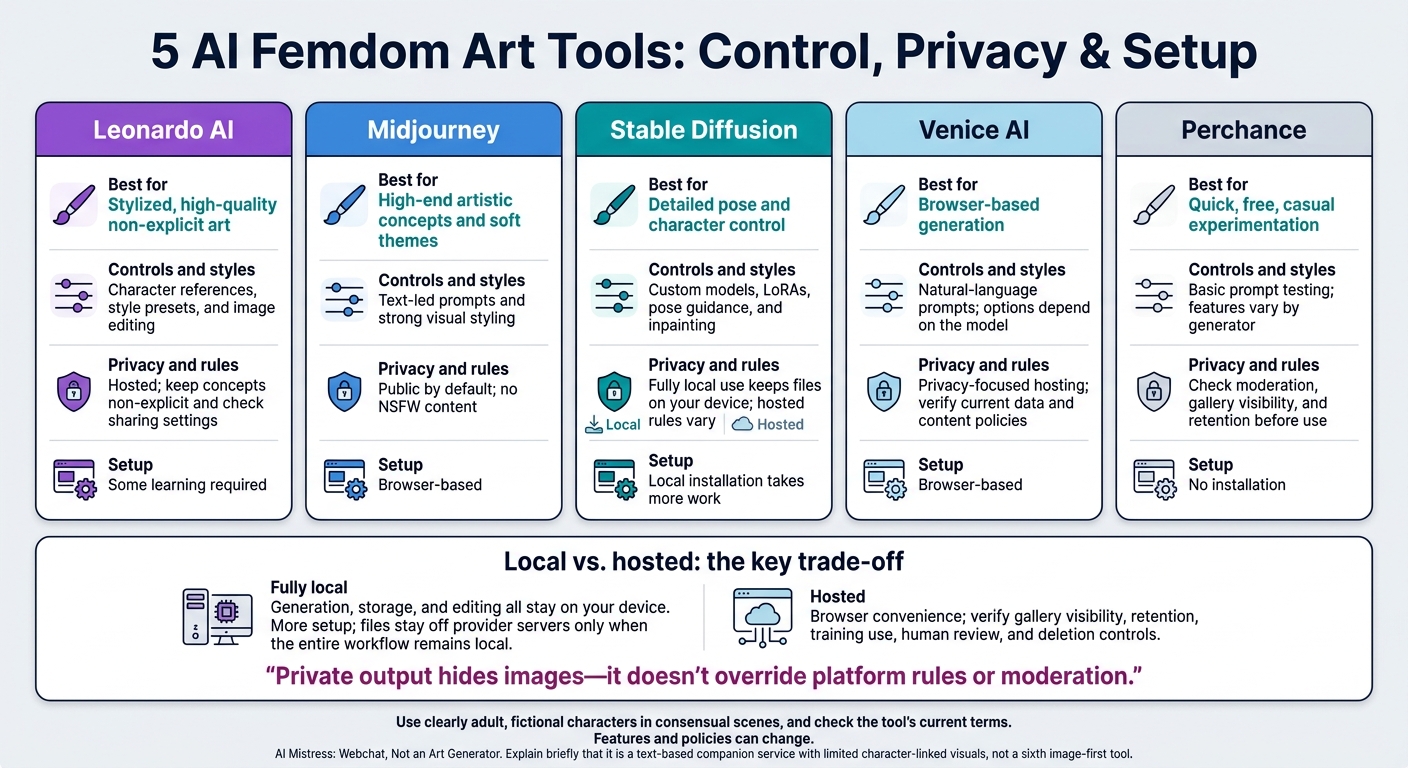
5 AI Femdom Art Tools: Control, Privacy & Setup
Adult Characters, Consent, and Content Rules
Include explicit adult ages in prompts and reference-image descriptions. Keep minors and age-ambiguous characters out of both prompts and reference images. These are the starting rules, but each tool has its own limits.
Use fictional characters built from original descriptions, not real identities. Describe features, clothing, and settings without naming celebrities, creators, or private individuals. Don’t upload real photos or request an identifiable likeness for intimate imagery without explicit permission for that use.
Describe consensual power exchange and set hard limits before generating a scene. Exclude non-consensual intimate imagery. Consent alone doesn’t make a prompt allowed - it must also meet the platform’s policy.
Before choosing a tool, check its limits on nudity, bondage, and fetish imagery separately. If a request gets blocked, switch to a permitted concept or stop. Don’t disguise prohibited content or bypass moderation. Read the rules for the exact service you plan to use before uploading references or submitting prompts.
sbb-itb-97c8eab
5 Tools at a Glance
Compare prompt control, privacy, and content limits to find a tool that fits the femdom scene you want to create.
| Tool | Prompt controls | Style options | Privacy model | Adult-content limits | Ease of use | Best use case |
|---|---|---|---|---|---|---|
| Leonardo AI | High (Alchemy/Canvas) | Extensive presets | Hosted; private on paid tiers | Moderate; suggestive content allowed. Check current policy. | Medium | Stylized, high-quality non-explicit art |
| Midjourney | Moderate; text-led | Strong aesthetic styling | Public by default; private tier available on paid plans | Strict; no NSFW. Check current policy. | Low | High-end artistic concepts and soft themes |
| Stable Diffusion (local / hosted) | Local: maximum control; LoRAs for customization and ControlNet for poses and structure. Hosted: depends on the provider. | Local: custom models and styles. Hosted: models depend on the provider. | Local: offline when run entirely locally. Hosted: account-based. | Local: user-controlled filtering; model rules still apply. Hosted: provider-specific. | Local: high. Hosted: medium. | Detailed pose and character control |
| Venice AI | High; depends on the model | Depends on the model | Privacy-focused hosting; check current policy | Less restrictive; check current policy | Low–medium | Private, unrestricted non-explicit themes |
| Perchance AI Image Generator | Moderate | Community models | Hosted; public or session-based | Minimal; check current policy | Low | Quick, free, casual experimentation |
Private output hides images - it doesn’t override platform rules or moderation.
Before prompting, check how each tool handles privacy and what content it allows.
1. Leonardo AI
Leonardo works best for polished mistress portraits, outfit variations, and non-explicit dominance scenes.
Prompt and Character Controls
In Leonardo AI, Prompt Generation turns a short idea into a more detailed prompt. Character Reference, found under Image Guidance, helps keep a character’s face and body traits consistent. Use it to carry the same mistress design across different poses, outfits, and scenes.
Styles and Image Editing
Choose Leonardo Phoenix to follow your prompt closely, Vision XL for photorealism, or Kino XL for a cinematic look. Elements add style cues, such as Vintage Photography.
Adjust the aspect ratio to frame your scene. Use Image to Image to guide changes to an existing image, and Canvas Editor to retouch selected areas. These tools let you fine-tune a dominant pose, wardrobe, or scene detail.
Privacy and Content Rules
Leonardo AI has stricter filters, making it a better fit for polished, stylized, non-explicit femdom art than heavy fetish scenes or explicit kink detail. Keep dominant-character designs non-explicit and artistic, as kink-related concepts may be filtered out.
The next tools offer more control over composition and customization.
2. Midjourney
Prompt and Character Controls
Midjourney accepts natural-language prompts. Describe an adult character, their pose, the framing, and the setting in clear sentences. In supported versions, use --cref to preserve facial and body traits.
Styles and Image Editing
Guide the image’s look with phrases like:
“cinematic lighting,” “dramatic shadows,” or “fine-line digital illustration”
Vary (Subtle) makes small changes, while Vary (Strong) changes poses and settings more. Remix lets you revise the prompt as you develop an image.
Privacy and Content Rules
Midjourney is public by default and tightly moderated. It’s better suited to polished, stylized, non-explicit femdom concepts than fetish-heavy scenes. If that fits your needs, the web interface is the fastest place to start.
Setup and Plans
Use Midjourney.com to generate or edit images through the web interface.
For more direct control over pose and structure, the next tool offers a more hands-on workflow.
3. Stable Diffusion
Stable Diffusion is the best fit when you want more control than a web-first generator offers.
Prompt and Character Controls
Stable Diffusion gives you hands-on control over custom femdom poses, outfits, and character consistency. Keep scenes consensual and non-explicit.
Start with a base model for the overall look. Then add a matching LoRA to keep characters or outfits consistent, and use ControlNet to guide poses with reference images. Negative prompts can reduce nudity and artifacts, but they can't guarantee either will be excluded.
Styles and Image Editing
Different checkpoints steer images toward realism or anime. Use inpainting to edit clothing or expressions, then generate a batch and upscale the best result. Before downloading a checkpoint, LoRA, or ControlNet extension, check that it works with your setup.
Privacy and Content Rules
Offline use keeps prompts on your machine. That's the main reason to choose local generation for private prompt handling. Hosted workflows follow the provider's data and moderation rules, so read those policies before uploading sensitive material.
Setup and Plans
Local use requires installation, model downloads, and a GPU with enough VRAM. You avoid per-image fees, but you'll need to account for hardware costs.
Hosted interfaces are easier to get started with, though subscriptions, credits, and feature access vary. Check model sources, hardware requirements, and licenses before use - especially for commercial work.
The next option moves from local control to privacy-focused hosting, with a different balance of access and moderation.
4. Venice AI
Prompt and Character Controls
Venice AI replaces local installation with browser-based access. Use natural-language prompts to describe adult characters, dominant posture, and fetish attire, including leather or latex.
Styles and Image Editing
Style presets and image-editing tools aren't clearly documented. Check the current interface before counting on either.
Privacy and Content Rules
Venice says prompts and images stay in your browser, with no server-side storage or training on user data. The platform is positioned for adult, NSFW, and kinky content, with fewer safety blocks than mainstream tools.
Setup and Plans
Signup is usually through email or a crypto wallet. Current free limits, pricing, and image caps aren't clear.
For a lighter, faster workflow, the next tool pares image generation back even further.
5. Perchance AI Image Generator
Prompt and Character Controls
Perchance runs in your browser, so there’s nothing to install. It’s an option for quick femdom prompt tests, though dedicated character-locking tools aren’t documented.
That makes it better suited to testing prompts than controlling scenes precisely.
Styles and Image Editing
Style presets and image-editing features aren’t documented. Features may also differ between community generators.
Privacy and Content Rules
Age rules, moderation, gallery visibility, and data retention aren’t clearly documented. Read the generator’s privacy and content terms before entering sensitive prompts.
Setup and Plans
Use is generally free, but speed depends on server load. No fixed credit system is documented. The draw is speed and simplicity rather than deep control.
Privacy, Data Use, and Content Limits
Before choosing a local or hosted workflow, compare how each handles retention, visibility, training, and deletion. Permission to create adult content does not mean private storage or processing.
The table marks details as unverified when the source material does not document them. ** - means unverified**, not that a tool lacks privacy protections. Content limits and data handling are separate issues.
| Tool or deployment | Prompt and image retention | Public-gallery visibility | Training use | Human review | Deletion controls | Privacy by plan |
|---|---|---|---|---|---|---|
| Leonardo AI | - | - | - | - | - | - |
| Midjourney | - | - | - | - | - | - |
| Stable Diffusion, fully local | Files stay on your device until you delete them | No automatic public gallery | No provider training from local files | No provider review | Manual file deletion | N/A |
| Stable Diffusion, hosted | - | - | - | - | - | - |
| Venice AI | - | - | - | - | - | - |
| Perchance AI Image Generator | - | - | - | - | - | - |
The main privacy advantage of a local workflow is that files stay off provider servers. But local means generation, storage, and editing all stay on your device. Check extensions for outside connections, keep output folders out of automatic cloud backups, and limit access on shared computers. Uploading a reference photo or finished image to a hosted service takes that material outside your local setup.
Before submitting sensitive material, check the provider’s policies and interface settings for gallery sharing, retention, external processors, training permissions, review access, and deletion timelines. Also confirm what encryption covers: prompts, images, and metadata - or only chat data.
AI Mistress: Webchat, Not an Art Generator
AI Mistress is a browser-based webchat platform for femdom and BDSM roleplay. It belongs here as a text-based companion service, not an art generator. It serves a different purpose than the image tools above.
The platform also offers limited image and video features linked to a character, rather than general prompt-based art generation. If you want to create visual scenes, the five tools above remain the image-first options.
Read the current Terms of Service and Privacy Policy before sharing sensitive details.
Conclusion: Choose by Controls, Privacy, and Rules
Choose a tool based on prompt control, privacy, content limits, and how you work. Pick Leonardo AI for guided revisions, Midjourney for stylized art, Stable Diffusion for maximum control, Venice AI for browser-based generation, or Perchance for quick tests.
Features and policies can change. Compare control, privacy, setup effort, and content limits before choosing. Hosted tools offer convenience; fully local workflows take more setup but keep data on your machine. Check how each service handles prompts and images.
Before generating, verify age, consent, and platform rules. Use clearly adult, fictional characters in consensual scenes, and check the tool’s current terms.
FAQs
How can I keep a character consistent across scenes?
Use the platform’s structured image generation tools instead of open-ended text prompts. To create your custom mistress, give detailed, consistent descriptions of her appearance, personality, and style.
AI Mistress stores generated images in a per-character gallery to keep her appearance consistent. Its persistent memory tracks your dynamic, helping her persona, conversational tone, and visual representation stay consistent across sessions.
How can I check whether my images stay private?
Read the platform’s privacy policy, since practices vary. Check whether it stores data to improve its services, what security measures it uses, and whether your images stay in your private account or appear in a public directory.
Some services keep chats and media so you can pick up where you left off. They may also share these materials with third-party providers for processing, while stating that they don’t use them to train their own foundation models.
Can I use AI-generated fantasy art commercially?
Commercial use depends on the platform’s terms of service. Most AI platforms built for personal roleplay and fantasy scenes, such as AI Mistress, restrict use to private, non-commercial purposes.
Before using generated content for business purposes, check the platform’s current terms of service or user agreement. These policies often ban selling or publicly sharing images created in private, kink-focused settings.